Codex Windows Sandbox Deep Dive — Building OS-Level Isolation for an AI Coding Agent
When I joined the Codex engineering team in September 2025, Codex for Windows didn't have a sandbox. Windows users were forced into two bad options: approve nearly every command the agent wanted to run, or enable Full Access mode and trust the model to behave. Both were bad product experiences, and both were avoidable.
That quote is from David Wiesen, the engineer who spent months designing the Codex Windows sandbox. His detailed engineering blog post walks through the entire journey — and it's one of the best-documented examples of how to think about agent sandboxing on an operating system that doesn't hand you a ready-made solution.
This article is not a translation. It's a structural analysis of why they made each decision, what patterns generalize beyond Windows, and what you should steal if you're building a sandboxed agent runtime yourself.
The Threat Model
Before discussing implementation, it's worth stating the threat model explicitly. Codex runs on developer laptops with the permissions of the logged-in user. The agent can read files, write files, spawn processes, and access the network by default. The model running in the cloud sends commands, and the harness executes them locally.
The sandbox needs to constrain two things:
-
File writes — the agent should only write within the workspace directory (and explicitly configured writable roots). Everything else should be read-only or inaccessible.
-
Network access — the agent should not be able to make arbitrary outbound connections. Without this, a compromised or hallucinating model could exfiltrate source code, environment variables, or credentials.
These constraints are not optional. They are the minimum to make an autonomous coding agent safe to run. And they must be enforced by the operating system, not by the harness — advisory restrictions collapse the moment a process decides to ignore them.
Why Windows Is Hard
On macOS, Codex uses Seatbelt (the macOS sandbox). On Linux, seccomp and bubblewrap provide kernel-enforced syscall filtering. Both are battle-tested primitives that can be configured to say: "this process tree can write here and connect there, and nothing else."
Windows doesn't have an equivalent. It has powerful isolation primitives, but none of them map cleanly to "let an autonomous agent operate like a developer."
The team evaluated three candidates:
AppContainer
AppContainer is Windows' native application sandbox, a capability-based model. You declare upfront what the app needs — file paths, network capabilities, device access — and Windows enforces those bounds.
The problem: Codex is not one tightly scoped app. It drives open-ended developer workflows that spawn shells, Git, Python, package managers, build tools, and arbitrary binaries. Declaring capabilities upfront for an unknown set of tools is impossible. AppContainer offers strong isolation, but for a much narrower class of workloads.
Windows Sandbox
Windows Sandbox is Microsoft's disposable lightweight VM. You get a fresh desktop inside a strong isolation boundary, and everything disappears when the session ends.
The problems are both technical and product-level. Technically, Codex needs to act on the user's actual checkout, tools, and environment — not inside a throwaway desktop that needs host/guest bridging. And from a product perspective, Windows Sandbox isn't even available on Windows Home SKUs. That alone disqualifies it.
Mandatory Integrity Control (MIC)
MIC uses integrity levels — low, medium, high — to control which processes can write to which objects. A low-integrity process cannot write to a medium-integrity object, even if the ACL allows it.
The idea was elegant: run Codex at low integrity, relabel writable roots as low integrity, and let Windows enforce no-writes everywhere else. No elevation required.
The fatal flaw: integrity labels are global, not per-sandbox. Marking a workspace as low integrity doesn't just mean "Codex can write here." It means any low-integrity process on the machine can write there. On a real developer machine, that turns the user's actual checkout into a low-integrity sink, which is much riskier than granting targeted ACLs to a single sandbox design.
This is worth pausing on: MIC's failure mode is exactly what happens when you try to repurpose a global system mechanism for a per-sandbox concern. The integrity concept is sound. The scope is wrong.
V1: The Unelevated Prototype
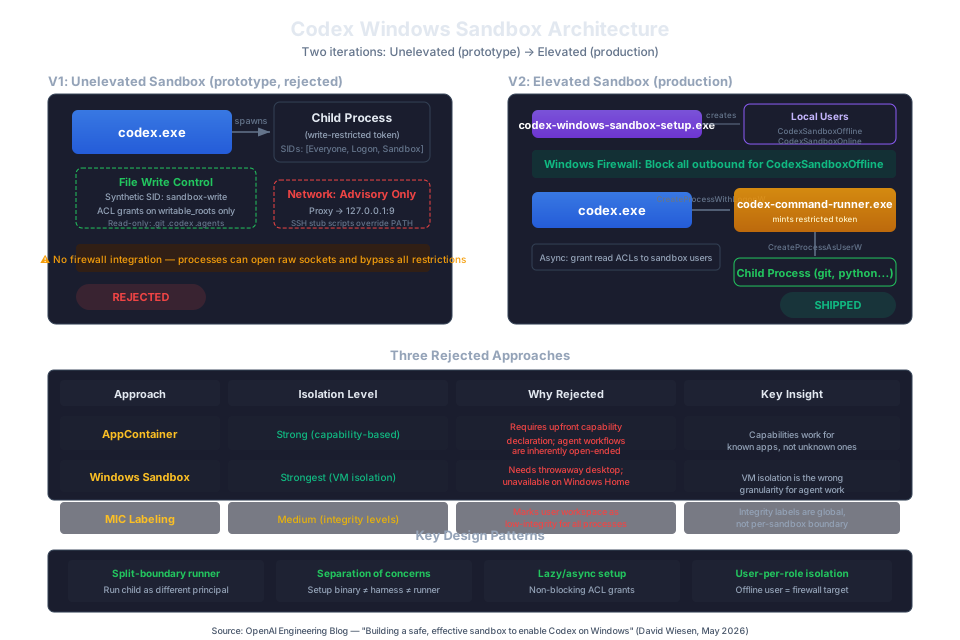
With all three standard options ruled out, the team built a custom solution. The first constraint was no elevation — Codex should work without prompting for administrator privileges.
File Write Control: SIDs and Write-Restricted Tokens
A SID (security identifier) is Windows' identity primitive. Users have SIDs, groups have SIDs, login sessions have SIDs. And you can create synthetic SIDs that don't correspond to any real user but can appear in ACLs.
The sandbox setup created a synthetic SID called sandbox-write. It was granted write access to the workspace directory and any configured writable roots, and explicitly denied on .git, .codex, and .agents subdirectories.
Codex then launched commands under a write-restricted token — a token that requires two checks to pass for any write operation: the normal user identity must be allowed, AND at least one SID in the restricted SID list must also be granted access. The restricted list contained Everyone, the logon session SID, and the synthetic sandbox-write SID.
This gave the team granular, explicit control over where the agent could write, using only standard Windows primitives and no elevation.
Network Suppression: Advisory Environment Manipulation
Without Windows Firewall (which requires elevation), the team tried to make the child environment fail-closed. They poisoned environment variables:
HTTPS_PROXY=http://127.0.0.1:9ALL_PROXY=http://127.0.0.1:9GIT_SSH_COMMAND=cmd /c exit 1
They prepended a denybin directory to PATH with stub SSH/SCP scripts, and reordered PATHEXT so the stubs would resolve before real binaries.
This caught most normal tool traffic. But it was advisory — a process could ignore environment variables, bypass PATH, or open raw sockets directly.
Why V1 Was Rejected
V1 had real strengths: no elevation, granular file write control, clean use of standard Windows primitives. But the network suppression was fundamentally broken. Advisory restrictions don't work against adversarial code, and even well-intentioned binaries that don't honor proxy environment variables would leak traffic.
Three issues were inherent to the custom approach: ACL application could be slow on large workspaces, the ACL footprint had to live on the real filesystem, and changing sandbox semantics required re-applying ACLs. But the network problem was the dealbreaker.
V2: The Elevated Sandbox
To get strong network suppression, the team needed Windows Firewall. And to target a firewall rule at the sandboxed process tree specifically — not at codex.exe generally, not at python.exe for all invocations — they needed to run the child processes as a different Windows principal.
This meant giving up the "no elevation" constraint.
Two Sandbox Users
The elevated sandbox creates two local Windows users:
CodexSandboxOffline— targeted by firewall rules that block all outbound network accessCodexSandboxOnline— not targeted by firewall rules (for when the user explicitly enables network access)
The firewall rule is simple and effective: block all outbound traffic for CodexSandboxOffline. No need to guess at proxy variables, no need to intercept socket calls, no path manipulation. The OS enforces it at the network stack.
The Command Runner: A Split-Boundary Architecture
Running child processes as a different user introduced a privilege wall. codex.exe runs as the real Windows user. But CreateProcessAsUserW — the API to launch a process as a different user — requires the calling process to already be running under that user's token.
The solution was codex-command-runner.exe, a dedicated binary whose only job is to mint a restricted token and spawn the requested command. The flow splits into two parts:
Part 1 — codex.exe calls CreateProcessWithLogonW to launch codex-command-runner.exe as the sandbox user (without a restricted token yet).
Part 2 — Inside the runner, it opens its own token (which belongs to the sandbox user), builds a restricted token from it, and calls CreateProcessAsUserW to launch the actual child (git, python, whatever).
This split is the key architectural insight. codex.exe can't spawn restricted children directly because it's on the wrong side of the user boundary. The runner is a trampoline: it lives on the sandbox-user side, where token restriction and child spawning are both allowed.
The Read Access Problem
When the child process runs as CodexSandboxOffline instead of the real user, it loses read access to files that are only ACL'd for the real user. The user's profile directory, for example, is not readable by other users by default.
The sandbox setup grants read ACLs to the sandbox users on commonly needed directories: the user's profile, C:\Windows, C:\Program Files, C:\Program Files (x86), and C:\ProgramData. This is done asynchronously because applying ACLs on large directory trees is expensive and shouldn't block the user.
The Four-Layer Architecture
The final design has four layers:
codex.exe— the normal user-mode harness, never elevatedcodex-windows-sandbox-setup.exe— runs once (or on config change), handles UAC elevation for user creation, ACL grants, and firewall rulescodex-command-runner.exe— launched for every command, bridges the user boundary, mints the restricted token, spawns the child- The child process — the actual command the agent asked to run, now operating inside the sandbox
Each binary has exactly one job. The setup binary crosses the UAC boundary so codex.exe never has to. The runner crosses the user boundary so codex.exe never has to. The architecture is clean precisely because each component's responsibility is sharply defined.
Design Principles Worth Stealing
After studying this architecture, several patterns emerge that apply far beyond Windows:
1. Split the Setup from the Runtime
Sandbox setup (user creation, ACL grants, firewall rules) is a fundamentally different job from spawning sandboxed processes. Separate binaries let you cross the elevation boundary only where needed, keep platform-specific machinery out of the main harness, and decouple long-running setup from the main process lifetime.
2. Use the OS, Not the Harness
V1 failed because environment-based network suppression is advisory. V2 succeeded because Windows Firewall is enforced at the kernel level. When you need a security boundary, use the operating system. Harness-level checks are convenience, not security.
3. Create Synthetic Identities for Fine-Grained Policy
The synthetic SID pattern — create an identity that exists only for the sandbox, grant it targeted access, then restrict processes to that identity — is clean and portable. On Linux, this maps to custom groups or SELinux categories. On macOS, to Seatbelt extensions with custom entitlements.
4. The Trampoline Pattern for Cross-Boundary Execution
When you need to run code under a different identity and your current process can't cross the boundary directly, insert a trampoline. The runner doesn't do anything except change context and hand off. This pattern shows up everywhere: setuid binaries on Linux, XPC services on macOS, and here as codex-command-runner.exe.
5. Lazy/Async Setup for Non-Critical Work
The read ACL grants run asynchronously. If they're slow, they don't block the user. If they fail, the sandbox degrades gracefully (some reads fail, user sees an error, can retry). Not every setup step needs to block the critical path.
6. Separation of Online/Offline Execution
The two-user pattern (Offline vs Online) is clever: instead of dynamically adding and removing firewall rules per command, create two identities with permanent rules and choose the right one at spawn time. This is simpler, faster, and less error-prone than rule manipulation.
Anti-Patterns: What Not to Do
Don't Repurpose Global Mechanisms for Per-Sandbox Concerns
MIC labeling failed because integrity levels are global, not per-boundary. The workspace being "low integrity for Codex" became "low integrity for everything." When you repurpose a system-wide mechanism, the side effects are system-wide too.
Don't Treat Advisory Controls as Security
Environment-based network suppression caught normal traffic and looked good in testing. But any security model that depends on processes choosing to cooperate is not a security model. It's a convenience feature with a misleading label.
Don't Assume Platform Features Are Universally Available
Windows Sandbox was disqualified partly because it's not available on Windows Home. If your product needs to work on consumer SKUs, don't build on enterprise-only features without a fallback.
Don't Collapse Setup into the Main Binary
Keeping codex-windows-sandbox-setup.exe separate from codex.exe was explicitly an architectural decision, not an implementation shortcut. Setup has different permission requirements, different failure modes, and different lifecycle concerns. Collapsing them would have polluted the main harness with platform-specific UAC logic.
The Security-Usability-Performance Triangle
This project is a case study in the tension between competing constraints:
| Dimension | Tradeoff Made | Rationale |
|---|---|---|
| Security | Elevated setup (UAC prompt) | Firewall integration requires admin privileges; advisory network control is not security |
| Usability | Async read ACL grants | Blocking setup for large directory trees is unacceptable UX |
| Performance | ACL application cost on large workspaces | Accepted as one-time setup; mitigated by async execution |
| Compatibility | Dedicated sandbox users instead of repurposing the real user | Enables firewall targeting but requires explicit read ACL grants |
| Complexity | Four-layer architecture over monolithic design | Each layer's responsibility is clear; complexity is localized, not spread |
The most interesting tradeoff is the elevation requirement. The team resisted it through an entire prototype cycle. They only accepted it when it became clear that strong network suppression required a mechanism that only elevation could provide. This is the right call: exhaust the simpler path first, then accept complexity when it's genuinely necessary.
Practical Checklist for Building an Agent Sandbox
If you're building a sandboxed execution environment for an AI agent, here's what to think about:
- Define your threat model explicitly. What can the agent do unsandboxed? What must the sandbox prevent? Write it down.
- Inventory your platform's isolation primitives. On Linux: namespaces, seccomp, cgroups, SELinux/AppArmor. On macOS: Seatbelt, sandbox-exec. On Windows: tokens, SIDs, AppContainer, firewall.
- Try the simplest approach first. The unelevated prototype took weeks, not months. It proved what worked (file writes) and what didn't (network). This is cheaper than designing the perfect architecture upfront.
- If your network suppression is environment-based, it's not suppression. Find a kernel-level mechanism or accept the risk explicitly.
- Separate setup from runtime, and elevation from normal operation. The harness should never be elevated. The setup binary crosses the UAC boundary once.
- Use synthetic identities for targeted policy. Don't grant permissions to the real user and try to subtract them. Create a new identity and grant only what's needed.
- Consider the trampoline pattern for cross-boundary execution. If you can't spawn directly, insert a process that can.
- Test on all target SKUs. Windows Home, Pro, Enterprise. Consumer and corporate environments. Features that don't exist on all variants are not features you can depend on.
- Grant read access asynchronously. It's slow and failure-tolerant. Don't make users wait for it.
- Verify that your restrictions survive
exec,fork, and process trees. A sandbox that only applies to the first process is broken. - Plan for sandbox semantics changes. ACL-based approaches are expensive to modify. Dynamic configuration approaches (like macOS Seatbelt's
.sbplfiles) are cheaper to evolve.
Limitations and Applicability
This sandbox is designed for a specific threat model: an AI coding agent running on a developer's laptop, where the primary risks are accidental file modification and data exfiltration. It is not designed to contain:
- Kernel exploits or privilege escalation attacks
- Hardware-level side channels
- Compromised system binaries running with higher privileges
The design also assumes the user trusts the Codex harness itself. If codex.exe is compromised, the sandbox provides no protection — the harness is outside the boundary.
These are not criticisms. Every sandbox has a threat model. The Codex team's model is correctly scoped to the actual risks of running an AI coding agent, and the implementation matches that scope precisely.
Sources
- David Wiesen, "Building a safe, effective sandbox to enable Codex on Windows," OpenAI Engineering Blog, May 13, 2026. https://openai.com/index/building-codex-windows-sandbox/
- HN discussion: Sandboxing Codex on Windows (2 comments, May 2026)
This analysis was produced as a technical deep-dive into the OpenAI engineering post. Architecture diagram is an original reconstruction based on the article's description of both prototype and production designs.