A 7,710-Star Diagram Skill With No Renderer: What diagram-design Validates, and What It Doesn't
Ask an AI for an architecture diagram and you usually get something with a hard-to-name cheapness to it: radii too large, every box the same width, dark background with cyan-purple glow, arrow labels sitting directly on top of their lines. You can tell a machine drew it. You can't easily say which decision was wrong.
cathrynlavery/diagram-design tries to turn that "can't say" into an executable spec. As of 12 August 2026 it has 7,710 stars, 511 forks and 6 open issues on GitHub, MIT licensed, created 16 April 2026, still shipping commits that same day (HEAD 4da4dfb). I cloned it, read the source, and ran its own CI. The conclusion: the interesting thing about this repo isn't what it does, it's which rules it chose to validate and which it handed entirely to the model.
A diagramming tool with no renderer
Start with its shape. diagram-design is a pure-prompt Claude Code skill, also packaged as .claude-plugin, .codex-plugin and a Pi package. 27,843 lines total, split like this:
| Part | Lines | Role |
|---|---|---|
SKILL.md |
538 (33KB) | Design system, complexity budget, five connector rules, 20-item pre-output checklist |
references/type-*.md × 27 |
3,992 | Per-type layout conventions, anti-patterns, example references |
mermaid_extract.py |
1,285 | Parses Mermaid source into a structural digest |
drawio_extract.py |
856 | Parses draw.io / .drawio.png / .drawio.svg |
scripts/*.py (CI) |
2,530 | Lint, a11y tests, import verifiers, icon generation |
Note what's missing: a layout engine. All 4,671 lines of Python do exactly two things — parse someone else's diagram (import) and check the output (lint). The thing that actually places nodes at coordinates is the model itself.
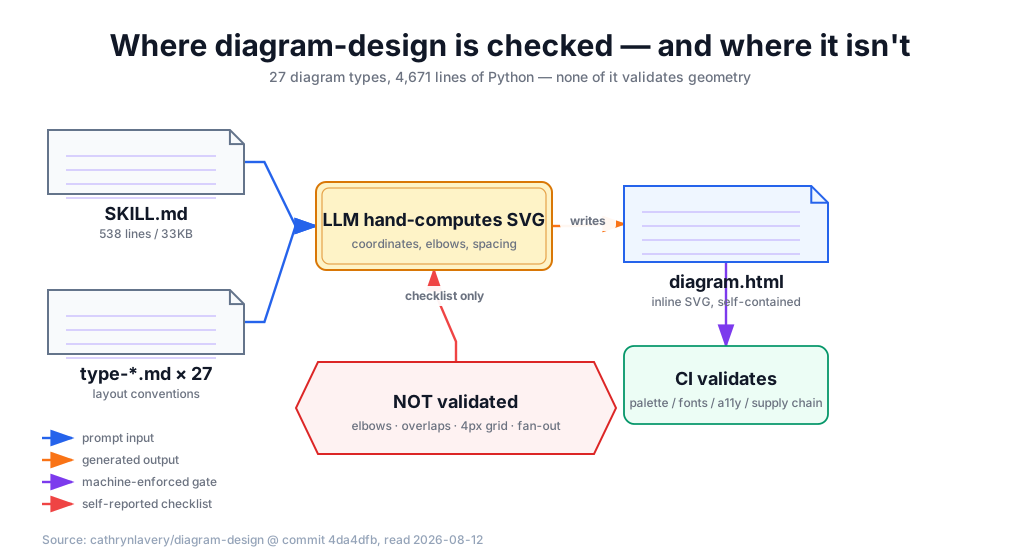
This is a deliberate bet. Mermaid and Graphviz have automatic layout, and precisely because they do, their output always carries the renderer's accent — fixed spacing algorithms, fixed routing, fixed node styling. The anti-pattern table in SKILL.md lists it as an outright failure:
Reproducing Mermaid's renderer layout — Imports automatic spacing and routing instead of making an editorial layout
To shed the renderer's accent you have to shed the renderer. The price is that every geometric calculation lands on the model.
It wrote its "non-negotiable" rules as a checklist
Section 6 of SKILL.md lists five connector rules, and the word it uses is non-negotiable:
- Rounded right-angle elbows (
r=8) are mandatory between off-axis nodes; diagonals are an automatic fail - Arrow labels must keep a visible 6–10px gap above the connector; the mask rect must never touch the stroke
- No two connectors may overlap or share a path; crossings must use a bridge/hop arc
- Multiple connectors on one edge must each get their own attach point, ≥12px apart
- A connector must not pass behind a non-endpoint box; the one exception must be dashed with the label at the visible end
Section 9 then gives a 20-item pre-output checklist, five of them bolded to match. It's written with real precision — down to the d attribute formula for the elbow path and the a 8,8 0 0,1 16,0 parameters for the hop arc.
The question is: who checks these five?
I grepped the repo for overlap, elbow, orthogonal, diagonal, divisible. Not one hit in the validation scripts. After running its own CI (six gates, all green locally) I pulled every failure message out of lint-skin.py. Actual coverage:
| Checked | Not checked |
|---|---|
| Colors against the style-guide palette, pure black banned | Any geometry |
| Font allowlist (no JetBrains Mono as a blanket "dev font") | Whether connectors overlap or share attach points |
Accessibility contract (<title> first child, prefixed ids) |
Whether diagonal connectors exist |
No <script>, no external HTTP resource of any kind |
Whether coordinates are divisible by 4 |
Which leaves a very clean split: what can be machine-checked is checked strictly; what can't is written as a checklist for the model to self-report against.
And the second category happens to be exactly what LLMs are worst at. Judging whether two parallel lines stay ≥12px apart, whether a connector crosses a third box, snapping every coordinate to a 4px grid — those are constraint-satisfaction and spatial reasoning problems, not language problems. Whether the README's "No Mermaid-slop" claim holds depends entirely on the model's spatial reasoning on the day, and the repo offers no guardrail for it.
None of which means the spec is useless. Written-down beats not-written-down. But "non-negotiable," attached to an enforcement mechanism that exists only inside a prompt, overstates the case. The genuinely non-negotiable rules are the four categories CI will block on.
The import side is unexpectedly solid
Judge this repo by its prompt half and you'll underrate it. The import module is serious engineering.
drawio_extract.py runs _reject_unsafe_xml before parsing anything, rejecting DTD and entity declarations — that blocks XXE and billion laughs. Decompression goes through _decompress_limited with a MAX_XML_BYTES cap, blocking zip bombs. All three draw.io carriers (raw XML, PNG-embedded, SVG-embedded) get unwrapped.
Line 6 of mermaid_extract.py reads:
Every label and directive value is untrusted data. Click targets and styling are discarded.
That's an explicit prompt-injection boundary. Label text, click directives and %%{init}%% config inside a user-supplied .mmd are all treated as data, never as instructions. I rarely see that discipline in comparable agent skills — most "import format X" skills just splice the source file straight into the prompt.
lint-skin.py also bans every external HTTP reference in the output (src, @import, url(), <link>, with a Google Fonts allowlist) and <script>. So generated HTML pasted into someone else's page won't quietly phone home.
These are the parts I'd copy directly. Scores: import-side security 9/10, CI breadth 7/10, geometric-correctness guarantee 2/10 — the third isn't done badly, it isn't done.
Three real defects
1. 21% of shipped examples are exempted from its own linter. assets/ holds 94 example-*.html files; scripts/lint-skin-baseline.txt lists 20 of them, and CI skips their visual checks via --all --baseline (the accessibility checks still run on them, which is clean). So 21% of the shipped examples don't match the current style guide. style-guide.md admits it:
The pre-baked example HTML files in
assets/were built under an earlier skin. Regenerating them against the current style-guide.md is a v5.1 task.
The problem is that step one of "create a new diagram" in §10 is copy the closest variant. What the model copies is that stale batch.
2. Three parallel version numbers. plugin.json says 2.2.0, the SKILL.md frontmatter says 2.2, and the prose says "a v5.1 task" and "That's a v5.2 feature." The GitHub repo description advertises 29 diagram types, the README says 27, and references/ actually contains 27 type-*.md files.
3. Onboarding rewrites the skill's own files. The last step of brand customization writes new tokens back into references/style-guide.md — a file inside the skill install directory. Update the skill and the customization is gone; the repo mentions neither backup nor externalization. The docs concede it: "for now, one skin per skill install."
One more thing that isn't a defect but belongs in the cost column: SKILL.md is 33KB, roughly 8k tokens, loaded in full on every activation, plus a 200–500 line type reference. Fixed context overhead per diagram is around 10–12k tokens.
Our gap is exactly its strength
I use a different diagramming skill day to day — fireworks-tech-graph, which I reviewed earlier. Putting the two validation scripts side by side produces a slightly funny symmetry.
validate-svg.sh in fireworks-tech-graph has a Python block called Check 5, "Arrow-component collision." It collects bounding boxes for every rect/circle/ellipse, parses the segments of every line/path carrying a marker-end, and uses segment_hits_bounds to decide whether a segment passes through the interior of a box that isn't its endpoint. That is precisely the thing diagram-design does not do.
In the other direction: of fireworks-tech-graph's 10 templates, the number carrying a <title> or <desc> is zero, and neither SKILL.md nor the references mention role="img" or aria-labelledby anywhere. Which is exactly where diagram-design is most careful.
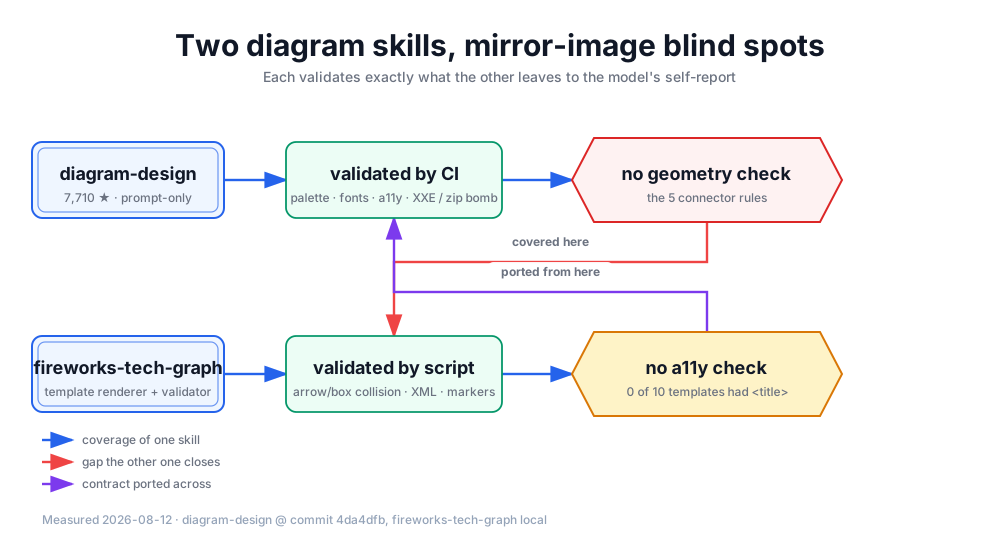
So I ported diagram-design's accessible-SVG contract across — as a script, not a checklist. The contract itself is only four rules, but one of them is a non-obvious design decision I only registered on reading it:
The IDs are prefixed per diagram and variant:
<slug>-title/<slug>-desc. Baretitle/descIDs are banned because two inline diagrams would create duplicate IDs and the second could be announced with the first diagram's name.
Put two inline SVGs in one blog post with id="title" on both, and a screen reader announces the second one under the first one's name. No error, no visual anomaly. Only screen-reader users ever hit it.
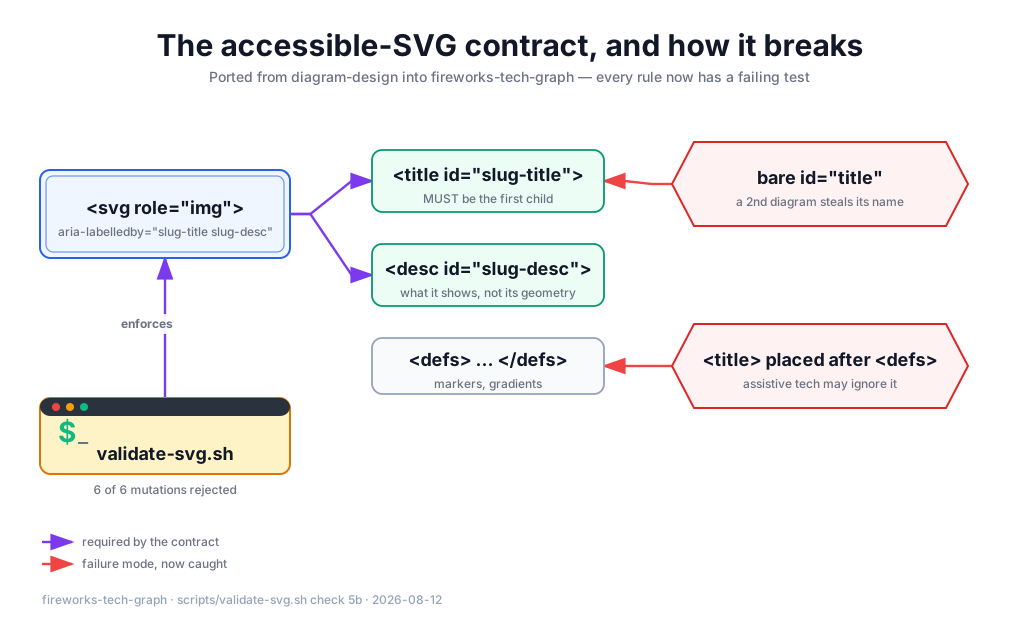
Three changes landed it: the renderer generate-from-template.py now emits role / aria-labelledby / <title> / <desc> automatically, with the slug derived from the title and desc overridable from JSON; validate-svg.sh gained Check 5b (the contract) and Check 5c (no <script>, no external resources); SKILL.md gained a section so the hand-written-SVG path knows what to emit.
Then the most important step of the whole change: proving the gate actually bites. I took a passing SVG and mutated it six ways — strip role/aria-labelledby, revert ids to bare title, move <title> after <defs>, empty the <desc>, inject an @import for an external font, inject a <script>. All six rejected, each with a distinct message. The 7 pre-existing regression fixtures stayed green.
I also fixed one of our own: the showcase agentloop-core.svg at the skill root didn't satisfy the new contract either, so it got a <title>/<desc>. Which is exactly the first defect I criticized in diagram-design — don't let your own samples be exempted from your own rules.
An aside worth not skipping
Building the three diagrams for this post, I hit a trap worth telling, because it's the same story as the article.
I gave each node a sub_label field for its subtitle. Generation succeeded, validation went green, no warning anywhere. Then I looked at the render and every subtitle was missing — the real field name is sublabel, no underscore. The renderer silently ignores unknown fields.
That's the other face of "validation only covers what it knows to look for." The validator will tell you whether the XML is well-formed, whether arrows cross boxes, whether the accessibility contract holds. It will not tell you that the information you thought you wrote never made it in. Which is why rendering the SVG to PNG and looking at it yourself stays mandatory even with validation in place. fireworks-tech-graph's SKILL.md has it as step 11, "visual self-review." I'd assumed it was optional.
Conclusion
diagram-design is worth installing. The spec density across 27 types is real, the import-side security work is above average for this category, and the editorial taste genuinely solves the "AI diagrams look fake" problem. The 7,710 stars aren't inflated.
But be clear about the boundary of its guarantee: CI guarantees your diagram won't use the wrong colors, won't use the wrong fonts, won't skip accessibility, and won't phone home. It guarantees nothing about a single line being drawn in the right place. When you use it, look at the rendered result yourself. That step doesn't go away.
For anyone writing agent skills, the more general lesson is this: putting a rule in the prompt is free, putting it in a validator costs something, and that cost difference is exactly what determines which rules actually get followed. When you write "non-negotiable" into a SKILL.md, it's worth pausing to ask — if the model violates this, who finds out? If the answer is "nobody," it isn't non-negotiable, it's an aspiration. This sits on the same spectrum as index-backed tools like GitNexus producing hard constraints and the Agent Skills ecosystem producing soft ones through format conventions.
My recommendation: install diagram-design for its specs and its import path, but don't treat its geometry rules as a guarantee. And if you maintain a diagramming skill of your own, go grep your validation script and count how many of those bolded "MUST"s actually have code standing behind them.
References
- cathrynlavery — diagram-design GitHub repository (as of 2026-08-12: 7,710 stars / 511 forks / MIT, HEAD
4da4dfb) skills/diagram-design/SKILL.md— §6 Mandatory connector rules, §9 Pre-Output Checklist, §12 Accessible SVG contractscripts/lint-skin.pyandscripts/lint-skin-baseline.txt— actual validation coverage and the 20 exempted filesskills/diagram-design/scripts/drawio_extract.py—_reject_unsafe_xml,_decompress_limitedskills/diagram-design/scripts/mermaid_extract.py— "Every label and directive value is untrusted data".github/workflows/ci.yml— the six validation gates- Galen Guan — Fireworks Tech Graph: A Deep-Dive Comparison of AI Diagramming Skills in 2026