Three FFmpeg Audio Mixing Traps: LUFS Parameterization, asplit Ducking, and amix Silent Attenuation from the OpenMontage Source
Anyone who does audio mixing in FFmpeg eventually hits the same wall: you write a filter_complex that looks perfectly reasonable, it works fine on your machine, then it explodes on CI. Or the output sounds fine but is permanently 2 dB quieter than the target platform spec. Or the narration is crystal clear when nobody's talking, but the moment background music kicks in, the voice gets buried. These aren't random bugs — they're inevitable consequences of how FFmpeg's filtergraph is designed. The documentation is just scattered across thirty pages of man pages, and you can't piece the full picture together without reading all of them.
OpenMontage (calesthio/OpenMontage, 392 commits as of August 2026) bills itself as "the first open-source, agentic video production system." Its audio mixing module, tools/audio/audio_mixer.py, recently received two consecutive fixes (commits 0ab9779 and 6426662) that happen to nail the three most classic FFmpeg audio traps. These fixes aren't just "change a parameter" — they reveal exactly where the reliability boundary lies for audio mixing in an AI-agent-driven video production pipeline.
Trap One: The loudnorm LUFS Target Was Hard-Coded
What LUFS Is, and Why -16 vs. -14 Isn't About "Volume"
LUFS (Loudness Units Full Scale) is the perceptual loudness standard defined by ITU-R BS.1770. It's fundamentally different from dBFS (peak level): dBFS measures the highest point of the waveform, while LUFS measures the average loudness your ear actually perceives. Two audio clips both peaking at -3 dBFS can differ by 10 LUFS — one might be a brief drum hit, the other sustained white noise.
Streaming platforms use LUFS for loudness normalization, so users don't have to reach for the volume knob every time they switch videos. But each platform normalizes to a different target:
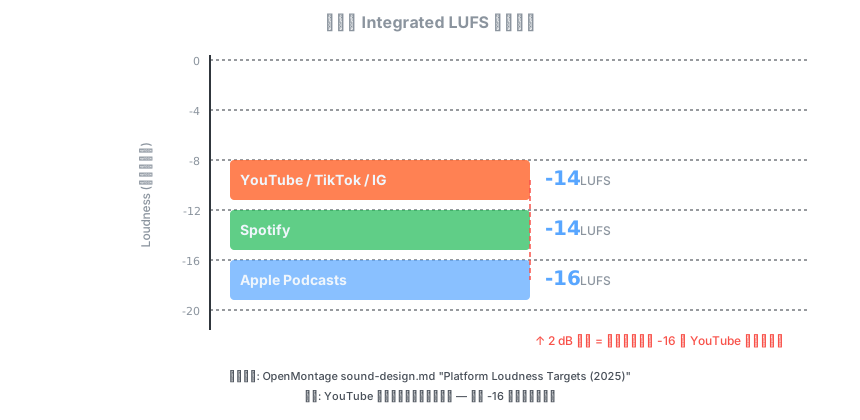
The critical detail: YouTube normalizes down, never up. If you deliver a video at -16 LUFS, YouTube won't boost it to -14 — it stays at -16, which means your video sounds quieter than other content on the platform. Apple Podcasts does the opposite, giving speech content more headroom at -16 LUFS.
OpenMontage's Fix: Parameterize -16 Instead of Hard-Coding
OpenMontage's audio_mixer.py originally wrote loudnorm like this:
# Old code: -16 hard-coded
filter_parts.append("[mixed]loudnorm=I=-16:LRA=11:TP=-1.5[out]")
Here I=-16 is the Integrated Loudness target. The problem: OpenMontage's own sound-design.md explicitly states:
TARGET LUFS: -14 LUFS (YouTube/TikTok/IG) | -16 LUFS (podcasts)
So the project's design document says YouTube needs -14, but the code always outputs -16. In an AI video pipeline this is especially dangerous: a director instruction (edit_decisions.metadata.loudnorm_target) might declare the target platform as YouTube, but the mixing tool completely ignores that field and silently outputs podcast-level loudness.
The fix parameterizes the LUFS target:
@staticmethod
def _loudnorm_filter(inputs: dict[str, Any], in_label: str, out_label: str) -> str:
    """Build a loudnorm filter graph edge honoring the per-call LUFS target."""
    target = inputs.get("loudnorm_target", -16)
    try:
        target = float(target)
    except (TypeError, ValueError):
        target = -16.0
    # Clamp to a sane loudness range to avoid malformed ffmpeg args.
    target = max(-40.0, min(0.0, target))
    return f"[{in_label}]loudnorm=I={target}:LRA=11:TP=-1.5[{out_label}]"
This does three things: (1) reads the target from input params, defaulting to -16; (2) defensively converts with float(), falling back on non-numeric input; (3) clamps to [-40, 0] to prevent anomalous values from generating invalid ffmpeg arguments.
The corresponding test file tests/tools/test_audio_mixer_loudnorm_target.py pins these boundaries with five cases:
def test_default_target_is_podcast_minus_16():
    assert "I=-16" in _filter({})

def test_youtube_target_minus_14_is_honored():
    assert "I=-14" in _filter({"loudnorm_target": -14})

def test_out_of_range_target_is_clamped():
    assert "I=0.0" in _filter({"loudnorm_target": 99})

def test_non_numeric_target_falls_back_to_default():
    assert "I=-16" in _filter({"loudnorm_target": "not-a-number"})
This is exactly the defensive strategy a production AI pipeline needs: parameter validity must be guaranteed in code before the value reaches ffmpeg, because ffmpeg's behavior on invalid arguments is undefined — different builds may silently accept or outright crash.
loudnorm's Three Parameters: I, LRA, TP
Understanding this filter also requires knowing what each parameter means:
| Parameter | Meaning | OpenMontage's Value | Notes |
|---|---|---|---|
I (Integrated) |
Overall loudness target | -16 or -14 (parameterized) | The critical one — maps to platform LUFS spec |
LRA (Loudness Range) |
Dynamic range of loudness | 11 | Controls gap between loudest and quietest parts; 11 is conservative |
TP (True Peak) |
True peak ceiling | -1.5 dBTP | Prevents intersample peak clipping |
One detail worth noting: TP=-1.5 matches YouTube's -1.5 dBTP spec, but TikTok uses -1 dBTP and Apple Podcasts also uses -1 dBTP. OpenMontage hasn't parameterized TP yet — if strict Apple Podcasts compliance is needed in the future, that's another thing to fix.
Trap Two: A filtergraph Label Can Only Be Consumed Once
How sidechain Ducking Works
Before diving into the bug, let's clarify what "ducking" is. Ducking means: when narration (speech) comes in, automatically lower the background music (music) volume; when narration stops, the music comes back up. This is a standard audio processing technique for podcasts, explainer videos, and documentaries.
FFmpeg implements ducking with sidechaincompress. The working principle: one audio signal (speech) feeds in as the "sidechain key," and another signal (music) is the "main input." When the sidechain key's energy exceeds the threshold, the compressor kicks in and reduces the main input's volume.
┌─────────┐                        ┌─────────────────────┐
│ speech  │──→ sidechain key ──→  │                     │
└─────────┘                        │ sidechaincompress   │──→ ducked music
                                   │ (music compressed)  │
┌─────────┐                        │                     │
│ music   │──→ main input ──────→ │                     │
└─────────┘                        └─────────────────────┘
The key insight: sidechaincompress only outputs the compressed music, not the speech. The speech merely participates as a "control signal" — it doesn't appear in the output stream. So when doing the final mix, you still need a copy of the speech to layer on top.
The Old Code's Fatal Error: Reusing the Same Label
OpenMontage's _full_mix operation needs to do both ducking and final mixing simultaneously. The old code's logic was:
- Use
amixto merge multiple narration segments into[speech_mix] - Feed
[speech_mix]tosidechaincompressas the ducking key - Re-use
[speech_mix]in the finalamix
Looks fine — but FFmpeg filtergraph has a hard rule: a filtergraph output label can only be consumed once. [speech_mix] was already consumed by sidechaincompress in step 2; referencing it again in step 3 is illegal.
On macOS's Homebrew ffmpeg build, this error was silently tolerated — certain ffmpeg versions auto-split labels that are referenced multiple times. But on CI's Linux ffmpeg build, strict label checking rejected the entire filtergraph, causing total CI failure.
The old code's comments reveal the painful debugging journey:
# sidechaincompress uses the speech signal only as the ducking key —
# it does not emit speech to the output. Re-derive the speech stream
# for the final mix below. (An earlier version also appended an
# `acopy[speech_dup]` here, but that pad was never consumed and left
# the filtergraph with a dangling output, which ffmpeg rejects — so
# single-narration + music full_mix always failed. FFmpeg auto-splits
# the reused input label, so no explicit duplicate is needed.)
This comment is itself a debugging log: first they tried acopy to duplicate, but that created a dangling output (ffmpeg rejects unconsumed outputs); then they switched to label reuse, relying on "ffmpeg auto-splits" behavior — which then failed on CI.
The Fix: Explicit Fork with asplit
The correct approach is to use asplit to explicitly divide the speech stream before it enters any consumer:
# Build ONE speech stream, then split it into two independent
# branches: one feeds the sidechain compressor as the ducking key,
# the other is mixed into the final output. A filtergraph label may
# only be consumed once, so reusing the same speech label for both
# the sidechain key and the output mix is invalid on stricter ffmpeg
# builds (e.g. the Linux ffmpeg on CI). asplit makes the fork explicit.
speech_indices = list(range(len(speech_tracks)))
speech_labels = "".join(f"[a{i}]" for i in speech_indices)

if len(speech_tracks) > 1:
    filter_parts.append(
        f"{speech_labels}amix=inputs={len(speech_tracks)}:duration=longest[speech_all]"
    )
else:
    filter_parts.append(f"[a{speech_indices[0]}]acopy[speech_all]")
filter_parts.append("[speech_all]asplit=2[speech_key][speech_out]")
The data flow after the fix:
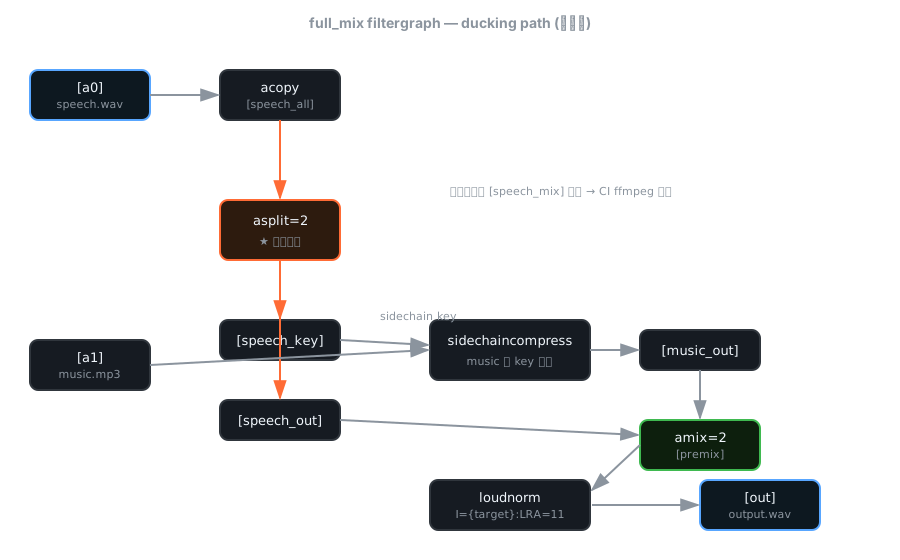
The line [speech_all]asplit=2[speech_key][speech_out] is the heart of the fix. It explicitly forks the speech stream into two independent streams before any consumer touches it: [speech_key] feeds sidechaincompress, [speech_out] feeds the final amix. Each stream is consumed exactly once — the filtergraph is fully legal.
The corresponding sidechaincompress call was also updated:
# Fixed: use [speech_key] instead of reusing [speech_mix]
filter_parts.append(
    f"{music_in}[speech_key]sidechaincompress="
    f"threshold=0.02:ratio=9:attack={attack}:release={release}:"
    f"level_sc=1:mix=0.9[ducked_music];"
    f"[ducked_music]volume={music_vol * 3}[music_out]"
)

# Final mix: the other speech branch + ducked music
mix_label = "[speech_out][music_out]amix=inputs=2:duration=longest[premix]"
sidechaincompress Parameter Breakdown
A few parameters here deserve deeper understanding:
| Parameter | Value | Meaning |
|---|---|---|
threshold |
0.02 | Triggers compression when speech energy exceeds 0.02 (~ -34 dB) |
ratio |
9 | 9:1 compression ratio — fairly aggressive ducking |
attack |
200ms | Ducking completes within 200ms of speech onset — gives a "smooth transition" |
release |
500ms | Recovery over 500ms after speech ends — avoids music "pumping" |
level_sc |
1 | No additional gain on the sidechain signal |
mix |
0.9 | Wet/dry mix — 90% compressed + 10% original signal |
The subsequent volume={music_vol * 3} is a compensating gain on the ducked music. music_vol defaults to 0.15 (music retains 15% energy after ducking); multiplying by 3 gives a linear gain of 0.45, ensuring the ducked music isn't too low in the final mix.
This design choice echoes Orca's engineering discipline: when you're doing audio processing on an AI-agent-driven production line, you can't rely on "ffmpeg runs on my machine" — you must write filtergraphs that are semantically identical across all ffmpeg builds. asplit isn't a performance optimization, it's a correctness guarantee.
Trap Three: amix's normalize=1 Silently Attenuates Your Narration
The Problem Scenario
OpenMontage also has a _segmented_music operation, used to insert background music during specific time segments of a video (e.g., "music during talking head, silence during showcase clips"). This operation uses FFmpeg's volume expression to control music volume across time segments:
# music_volume expression: play inside segments, silence outside, fade at boundaries
volume='{vol_expr}':eval=frame
Then mixes it with speech via amix:
# Old code
f"[speech][music_fmt]amix=inputs=2:duration=first:dropout_transition=2[aout]"
Looks fine. But amix has a default parameter normalize=1, whose behavior is: divide each input by the input count. Two inputs → each multiplied by 0.5 → that's -6dB.
In the _mix and _full_mix operations, this problem is masked by loudnorm: the final output goes through loudnorm, which pulls overall loudness back to the target, so the -6dB attenuation gets compensated. But the _segmented_music path has no loudnorm stage — the attenuation is permanent.
What makes this even more insidious: the -6dB attenuation applies to all inputs, including speech. So even when the background music's volume expression is 0 (completely silent) during certain stretches, the speech is still attenuated by -6dB. The impact on narration clarity is devastating.
The Fix: normalize=0
# normalize=0: amix's default normalize=1 divides every input by the
# input count (here x0.5 / -6 dB), which would permanently attenuate
# the narration across the whole timeline — including stretches where
# the music volume expression is 0. The music is already scaled by the
# `volume` expression, so speech must pass at unity. Unlike _mix/
# _full_mix, this path has no loudnorm stage to mask the halving.
f"[speech][music_fmt]amix=inputs=2:duration=first:dropout_transition=2:normalize=0[aout]"
With normalize=0, amix no longer does automatic division — each input participates in the mix at its original level. The music has already been scaled by the volume expression, and speech passes through at unity.
This is a classic case of "two bugs cancel each other out, fixing one exposes the other." In the _full_mix path, amix's normalize attenuation was compensated by loudnorm, so nobody noticed. The moment you go down a path without loudnorm (_segmented_music), the bug surfaces. If you want consistent behavior across your entire pipeline, the right approach is to explicitly declare the normalize strategy on every amix call, rather than relying on a downstream filter to "happen to" compensate.
Why These Three Fixes Matter for Production AI Video Pipelines
1. Parameterization Depth Determines Pipeline Flexibility
Parameterizing the LUFS target from a hard-coded value seems like just adding a loudnorm_target field. But the real significance is this: it completes the chain from director instructions (edit_decisions.metadata) to the execution layer (ffmpeg parameters). In an AI-agent-driven system, this means a director can say "this video goes to YouTube," and the system automatically sets the LUFS target to -14 — no human needs to change code in between.
This is also why OpenMontage chose to do clamping and type conversion inside _loudnorm_filter rather than pushing validation to JSON schema: parameters coming from an AI agent can be any shape. A string-typed -14, a NaN, a value beyond physical limits — the code must handle all of these gracefully, because the agent won't read your API docs.
2. CI Portability Is Part of "Correctness"
The asplit fix reveals a broader FFmpeg principle: a filtergraph's semantics cannot depend on a particular build's "lenient behavior." If your filtergraph runs on macOS Homebrew ffmpeg but crashes on Linux CI's ffmpeg, that's not "the CI environment has a problem" — your filtergraph was illegal from the start, just tolerated by a lenient build.
| FFmpeg filtergraph Rule | Violation Consequence | When It Surfaces |
|---|---|---|
| Output label consumed only once | Filtergraph rejected | When switching ffmpeg builds |
| All labels must have a consumer | "Dangling output" error | Always |
| Input labels must exist | Filtergraph rejected | Always |
asplit is the only reliable way to make a filtergraph semantically consistent across all ffmpeg builds. In an AI video pipeline, this means your agent's audio processing instructions produce identical output on dev machines, CI servers, and production environments — the prerequisite for "reproducible builds."
3. Cascading Effects of Default Parameters
The amix normalize issue showcases a larger FFmpeg design philosophy: many filters have implicit "smart" default behaviors that are beneficial in simple scenarios but interfere with each other when combined. normalize=1 makes sense for pure mixing (prevents clipping from stacked inputs), but once upstream volume has already done precise level control and downstream there's no loudnorm to compensate, this "smart" default becomes the root of a bug.
In a system with multiple mixing paths (OpenMontage has four: _mix, _duck, _full_mix, _segmented_music), you need to ensure each path has a consistent expectation of amix's normalize behavior. The safest approach is to always declare normalize=0 or normalize=1 explicitly, never relying on defaults — because defaults can change between FFmpeg versions.
For those equally interested in the reliability of AI-agent-driven media pipelines, I previously broke down ntfy vs Gotify vs Nostr for push notifications — that's the agent system's "last mile" (how cron results reach your phone). Audio mixing is the "first mile": whether the video your agent generates sounds right on every platform.
A Complete full_mix filter_complex Example
Combining all three fixes, here's a complete _full_mix filter_complex (single narration + single background music + ducking + loudnorm, targeting YouTube at -14 LUFS):
# Inputs: -i narration.wav -i bgm.mp3

[a0]acopy[speech_all];
[a1]acopy[music_in_raw];
[speech_all]asplit=2[speech_key][speech_out];
[music_in_raw][speech_key]sidechaincompress=threshold=0.02:ratio=9:attack=0.2:release=0.5:level_sc=1:mix=0.9[ducked_music];
[ducked_music]volume=0.45[music_out];
[speech_out][music_out]amix=inputs=2:duration=longest[premix];
[premix]loudnorm=I=-14.0:LRA=11:TP=-1.5[out]
To read this filtergraph, trace labels from top to bottom, left to right: [a0] and [a1] are the audio tracks of ffmpeg's input streams; each ; separates one filter operation; labels pass through in square brackets; asplit turns one stream into two; finally [out] is selected by -map for output.
Note the final loudnorm with I=-14.0 — that's the parameterized YouTube target. Switch to a podcast and it becomes -16.0; everything else stays identical.
Conclusion
These three fixes point to the same lesson: FFmpeg's filter_complex isn't a "pipeline" — it's a directed acyclic graph (DAG) with strict topological constraints. Every node's (filter's) input and output labels must match precisely, each label can only have one outgoing edge, and filter defaults can interfere with each other when combined.
In an AI-agent-driven video production pipeline, these constraints mean three things:
- All platform-relevant parameters (LUFS, TP, sample rate) must be parameterized, and parameter validation must happen before the value reaches ffmpeg — you cannot assume the agent always sends valid values.
- The filtergraph must be semantically consistent across all ffmpeg builds —
asplitisn't optimization, it's correctness. CI's ffmpeg is your "strict mode" test. - Never rely on a filter's default behavior to "happen to" be correct —
amix normalize=1is harmless with loudnorm but lethal without. Declare every parameter explicitly.
OpenMontage's three fixes total just 84 lines of changed code (+84/-2 lines), yet they transformed an audio mixing tool that "works on my machine" into a production-grade component that's reliable on CI and compliant across platforms. That's the gap between amateur tooling and production tooling — it's usually not in feature count, but in the depth of edge-case handling.
References
- calesthio — OpenMontage GitHub Repository —
tools/audio/audio_mixer.py, commits0ab9779+6426662 - FFmpeg — loudnorm filter documentation — EBU R128-based dynamic loudness normalization
- FFmpeg — sidechaincompress filter documentation — Sidechain audio compressor
- FFmpeg — asplit filter documentation — Pass audio input to N outputs
- ITU-R — BS.1770-4: Algorithms to measure audio programme loudness and true-peak audio level — The LUFS standard
- EBU — R128: Loudness normalisation and permitted maximum level of audio signals — European Broadcasting Union loudness spec
- Apple — Podcasts Specifications for Creators — -16 LUFS / -1 dBTP
- Google — YouTube Audio Normalization — -14 LUFS / -1.5 dBTP, normalizes down only
- OpenMontage — sound-design.md — Platform loudness targets (2025)
- OpenMontage — test_audio_mixer_loudnorm_target.py — LUFS parameterization regression tests