Self-hosting on residential broadband without a public IPv4 address presents a familiar dilemma: an on-premises NAS offers substantial disk capacity and compute, but remote access is often throttled by proprietary relay services. Meanwhile, a modest cloud VPS (e.g., 2 vCPU / 2GB RAM) possesses a stable public IP but quickly runs out of memory when hosting multiple production workloads.
This article documents a complete architectural migration: using Tailscale to join endpoints, a home NAS, and a cloud server into a unified virtual mesh network (tailnet); establishing direct P2P NAT traversal; and offloading container workloads to the NAS while reducing the cloud VPS to an edge reverse proxy and TLS termination gateway.
The migration unfolded across three primary phases:
| Phase | Core Objective | Key Actions |
|---|---|---|
| Network Foundation | Establish private mesh & unblock P2P traversal | Joined all devices to the tailnet, configured bare Git on NAS, applied a static UDP mapping on the optical modem to trigger direct connections |
| Topology & Boundary Verification | Define public exposure & access boundaries | Joined cloud VPS to tailnet, evaluated and dismantled public management endpoints, converged on edge tunnel proxying |
| Service Migration & Offloading | Workload offload & edge downsizing | Migrated task board and blog to NAS Docker, transferred databases with WAL consistency, decommissioned legacy cloud containers |
1. Network Foundation: Overcoming the NAT Relay Bottleneck
1.1 Deploying Tailscale on Synology DSM
When installing Tailscale on Synology DSM (7.x), the built-in Package Center may not feature the latest packages. It is preferable to retrieve the architecture-appropriate .spk package directly from Tailscale's official repository and verify its SHA256 checksum prior to installation.
# Grant non-root operator privileges and start Tailscale
sudo /var/packages/Tailscale/target/bin/tailscale set --operator=$USER
sudo /var/packages/Tailscale/target/bin/tailscale up
The --operator flag permits managing Tailscale via CLI commands such as tailscale status and netcheck without root privileges.
1.2 Upgrading from DERP Relay to Direct P2P
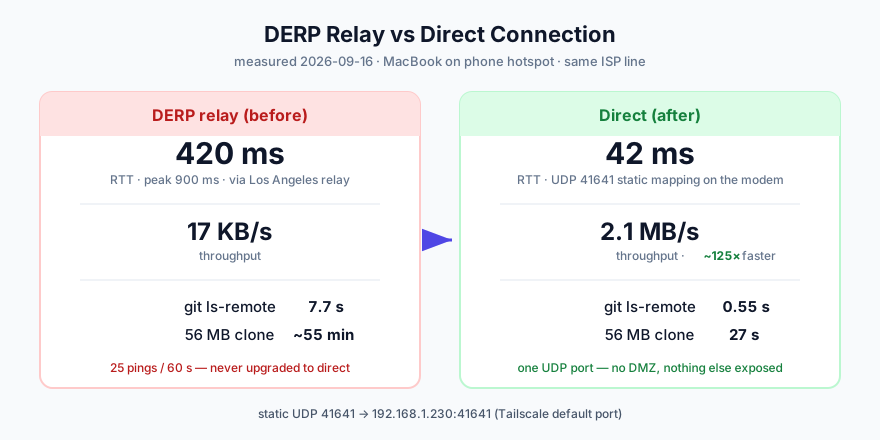
Upon initial setup, connections initiated from cellular or foreign networks often default to DERP (Designated Encrypted Relay for Packets) relays:
- DERP Relay Metrics: ~420ms RTT, ~17KB/s throughput, and 7.7s for
git ls-remote. - Root Cause: The ISP gateway (residential optical modem) had UPnP disabled, and symmetric NAT behavior prevented automated STUN traversal.
Resolution: Access the gateway administration portal and configure a single static port forwarding rule: External UDP 41641 → NAS Internal IP UDP 41641 (Tailscale's default listening port).
Important: Never use DMZ mode, as it needlessly exposes NAS management ports (5000/5001) and SMB (445) to the public internet. Furthermore,
tailscale netcheck'sPortMappingfield only reports UPnP/NAT-PMP protocol negotiation results, not manual router port forwarding; verify success by checking for thedirectflag and low latency intailscale status.
Once the rule took effect, off-site testing demonstrated an immediate transition to direct P2P:
- Direct P2P Metrics: RTT dropped to 42ms, throughput increased to 2.1MB/s (~125× throughput gain), and
git ls-remotefinished in 0.55s.
1.3 Configuring Bare Git Repositories on DSM
Synology DSM ships with Git, allowing it to function directly as a private Git server:
# Initialize bare repository
mkdir -p /volume1/git/project.git
cd /volume1/git/project.git && git init --bare
Key Configuration Details:
- User Home Service: Enable "User Home Service" under DSM Control Panel → User & Group → Advanced; otherwise, user home paths do not exist and SSH public key authentication fails.
- Permission Hardening: Synology sshd enforces strict directory permissions: user home must be
0711,.sshmust be0700, andauthorized_keysmust be0600. Overly permissive permissions cause key authentication to silently fail. - Transport Protocol: DSM disables the SFTP subsystem by default, which causes
scpto fail. However, Git over SSH utilizesgit-upload-packand operates independently of SFTP.
2. Topology Design: Establishing Security Boundaries
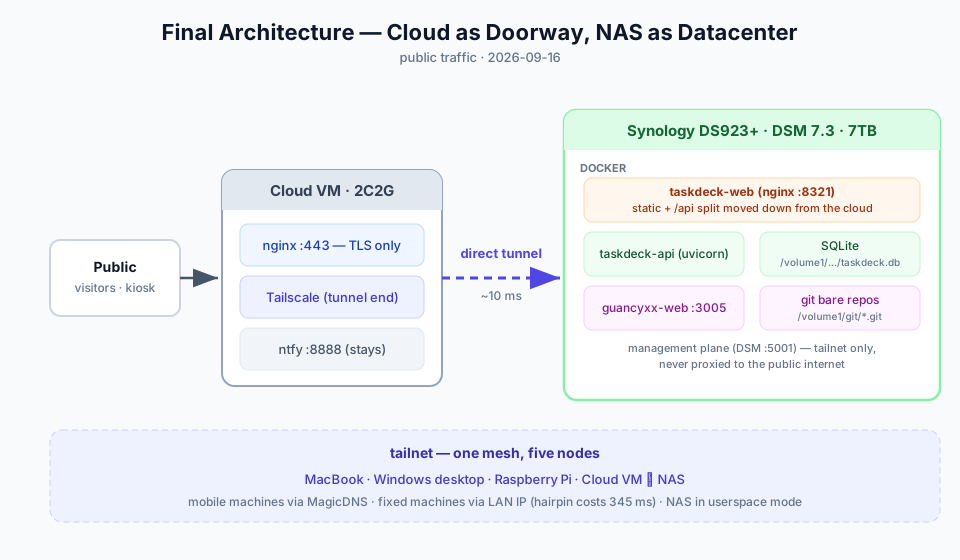
Once the cloud VPS and NAS are interconnected via the tailnet, inter-node latency stabilizes around 10ms, providing the foundation for an "edge proxy + internal compute" architecture.
Isolating the Management Plane from the Service Plane
During early testing, exposing the DSM management portal via a cloud Nginx reverse proxy was evaluated. However, public web server logs quickly showed automated directory fuzzing and exploit scanning targeting port 443. The design was promptly adjusted to enforce strict plane isolation:
- Keep Management Local: DSM Web UI, SSH, and storage interfaces are strictly restricted to the internal LAN or authenticated tailnet peers, with no public ingress.
- Edge Ingress for Services: Only standard web ports (80/443) on the cloud VPS remain public-facing for application traffic.
- Tunnel-Based Forwarding: The cloud Nginx terminates TLS and forwards requests through the Tailscale mesh IP directly to target application containers on the NAS.
3. Production Migration: Workload Offloading and Edge Optimization
3.1 Downsizing Edge Nginx to a Pure Proxy Pipe
Before migration, the cloud Nginx handled both static asset hosting and API routing locally. Post-migration, the cloud configuration was simplified to SSL termination and upstream proxying:
server {
    listen 443 ssl http2;
    server_name tasks.example.com;

    ssl_certificate     /etc/letsencrypt/live/tasks.example.com/fullchain.pem;
    ssl_certificate_key /etc/letsencrypt/live/tasks.example.com/privkey.pem;

    location / {
        proxy_pass http://100.x.y.z:8080; # NAS tailnet IP
        proxy_set_header Host $host;
        proxy_set_header X-Real-IP $remote_addr;
        proxy_set_header X-Forwarded-For $proxy_add_x_forwarded_for;
        proxy_set_header X-Forwarded-Proto $scheme;
    }
}
Static bundling and granular path routing are delegated to the NAS containers, turning the cloud VPS into a stateless forwarder.
3.2 Deployment Pipeline Migration
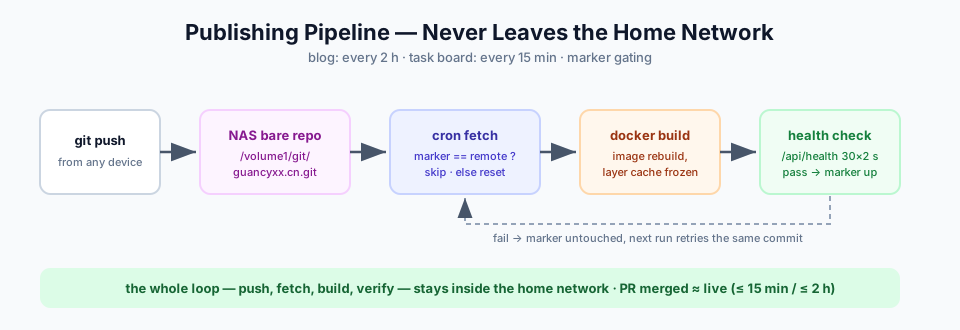
The deployment automation relies on a .deployed-commit state marker that only advances once all build steps and container health checks pass successfully.
For code delivery, the local NAS bare repository was configured as the workflow upstream. Scheduled cron tasks fetch updates and build containers locally, eliminating repeated round-trips to external repositories:
3.3 Data Consistency and SQLite WAL Migration
For lightweight applications backed by SQLite, ensuring consistency during state transfer is critical:
- When operating in WAL (Write-Ahead Logging) mode, data spans
app.db,app.db-wal, andapp.db-shm. - Ensure application containers are stopped before copying all three files simultaneously, or execute
PRAGMA wal_checkpoint(TRUNCATE);to flush all changes into the primary database file before file transfer.
Following data transfer and container cleanup on the cloud VPS, host memory usage stabilized at approximately 360MB, freeing up substantial compute and storage overhead.
4. Troubleshooting and Practical Insights
The following matrix summarizes the technical issues encountered during migration and their solutions:
| Symptom / Error | Root Cause | Solution |
|---|---|---|
Container fails to bind Tailscale IP with cannot assign requested address |
Tailscale on Synology runs in userspace-networking mode; no virtual tailscale0 network interface exists on the host |
Bind containers to 0.0.0.0; Tailscale handles user-space forwarding to the local port |
| LAN devices experience high latency (>300ms) accessing NAS via Tailscale | The ISP gateway lacks NAT Hairpin support, forcing LAN traffic through the public WAN endpoint | Configure LAN hosts or split-horizon DNS to use direct local IPs while on-premises |
| NAS Docker images and containers vanish after updating daemon configuration | Synology stores Docker settings in dockerd.json with required attributes like data-root and storage-driver: btrfs |
Merge mirror arrays into the existing JSON configuration rather than overwriting the entire file |
| Nginx reverse proxy returns 502 Bad Gateway after container redeployment | Nginx resolves container upstream hostnames once during startup; redeployment yields a new internal IP | Define resolver 127.0.0.11 valid=10s; and use a variable inside proxy_pass to enforce dynamic re-resolution |
| Healthcheck probe scripts report false negatives (all ports closed) | The base container image lacked nc, and non-root users lacked Raw Socket privileges for ping |
Validate diagnostic tool reliability against known-open endpoints before embedding them into automated health checks |
Security Implications of Userspace Networking
Running in userspace networking mode introduces specific architectural constraints:
- Source IP Rewriting: Inbound packets forwarded via Tailscale to the host appear as originating from
127.0.0.1. - Host Firewall Inefficacy: Host-level firewall rules matching source IPs cannot differentiate individual Tailscale clients.
- Wider Binding Scope: When containers bind to
0.0.0.0, the service is exposed to both Tailscale and the surrounding local area network.
5. Architectural Trade-offs and Considerations
Deploying production workloads into a residential homelab requires balancing advantages against operational constraints:
- Suitable Workloads: Personal knowledge repositories, task trackers, and lightweight internal tools. Their read/write patterns match residential broadband bandwidth, and direct P2P mesh paths deliver minimal latency.
- Unsuitable Workloads: High-availability services requiring strict SLAs, or applications involving large public egress bandwidth. Residential availability remains bounded by local power delivery, modem reliability, and ISP maintenance.
- Disaster Recovery Imperative: Shifting data from managed cloud environments places backup responsibility entirely on the operator. Periodic snapshots must be supplemented with off-site, encrypted backups to ensure true disaster recovery resilience.
References
- Tailscale — Architecture and Concepts Documentation
- Tailscale — Synology NAS Deployment Guide
- Docker — Daemon Configuration and Registry Mirrors
- Nginx — Reverse Proxy and Dynamic Upstream Resolution Reference