Anyone generating multi-shot AI video has hit the same wall: in shot one the heroine's hair, jacket, and face are right; cut to shot two and she's wearing a different face. Character drift is one of AI video's most notorious problems — describe "what she looks like" to the model once per shot, and the model re-imagines her every time, so she comes out different every time.
The nine-panel grid (a 3×3 storyboard) solves this with an almost cheating-level trick: draw nine keyframes onto one canvas. Because all nine cells share a single image, the image model naturally keeps the same character in the same outfit in the same setting across every cell. Consistency isn't earned by repeated nagging — it's forced by the canvas itself.
What the grid is, and why it works
One image, three by three, nine cells, with white gutters between them. The cells read left-to-right, top-to-bottom = chronological order, one narrative beat per cell (shot size optional). This image isn't a comic for humans to read — it's a visual skeleton fed to the video model.
The key is how the video model consumes it. It does not pan a camera across the grid. It treats the whole image as two things at once:
- Visual DNA — character appearance, wardrobe, location, lighting, and palette are all locked from this one image;
- A storyboard script — following the 1→9 order, it interpolates/performs the nine static keyframes into one continuous clip (typically 15 seconds).
The division of labor in one line: the image decides "what it looks like and what happens"; the prompt only decides "how it moves."
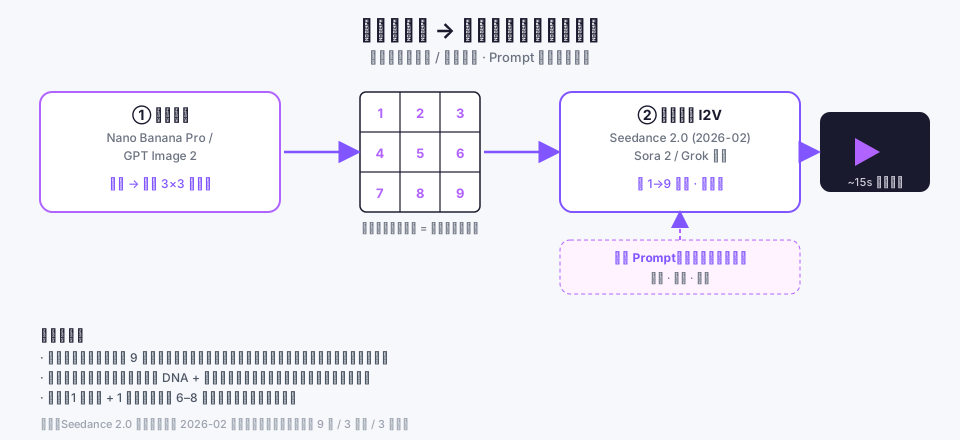
This blew up in the first half of 2026 for one direct reason: image-to-video (I2V) crossed a quality threshold. ByteDance's Seedance 2.0 launched in February 2026 (internal test Feb 7, live on Dreamina Feb 10, full rollout Feb 12), with multimodal input accepting up to 9 images, 3 video clips, and 3 audio files plus a natural-language instruction at once. Hand it a nine-panel grid and it automatically produces camera motion and localized animation — work that used to require a human editor, now delegated to the generative model.
The mainstream workflow: a two-step combo
The dominant pattern today is a single template: image model draws the grid → video model performs it via I2V.
- Image: Nano Banana Pro or GPT Image 2 are the community favorites, because they draw clean panels, stable white gutters, and hold the character consistent across all nine cells.
- Perform: Seedance 2.0 (the go-to on Dreamina in China), Sora 2, and Grok all consume a grid.
The prompt split is the heart of the technique. The image already fixed the look and composition, so the prompt should not describe appearance at all — only motion:
Using the nine-panel storyboard in @image1, perform it in order
(left-to-right, top-to-bottom) as one 15-second clip. Keep the visual
style consistent, favor slow push-in/pull-back camera moves, keep
transitions smooth, and hold an unhurried overall pace.
Advanced setups stack a spatial anchor on top: generate a top-down floor plan plus a wide establishing shot to lock the room's spatial logic, then use the grid to lock the characters. The community calls that top-down view the "anchor for indoor spatial logic" — because scene consistency is harder than character consistency, and the grid alone won't stop the location from drifting after a scene change.
Strengths and limits: don't treat it as a silver bullet
The grid isn't optimal everywhere. Put it next to the two other common referencing methods and the trade-offs become clear:
| Dimension | Nine-panel grid | Single reference image | Multiple separate refs |
|---|---|---|---|
| Cross-shot consistency | Strong (one canvas locks it) | Weak (locks one moment) | Medium (per-shot, drifts) |
| Cost | Low (1 image + 1 video) | Low | High (6–8 shots, each generated multiple times) |
| Iteration speed | High (edit one image, regenerate) | High | Low (changes ripple shot-by-shot) |
| Narrative capacity | Limited (≤ 9 beats) | Single shot | High (unlimited shots) |
| Scene changes | Weak (location drifts) | Weak | Medium |
| Fit requirement | Content must fit a 3×3 | None | None |
My take: for character-driven, action-dense passages that fit into nine beats, the grid is hands-down the most cost-effective consistency method available right now. But it has three hard edges — cross one and use something else:
- More than nine clear beats won't fit — force it to twelve panels and a 15-second clip feels rushed, and the pacing collapses.
- Not for shots with extreme visual variation — new sky, new place, new people: the grid's "one-canvas consistency" becomes a straitjacket.
- Scene consistency is still unsolved — the grid holds the person, not "the next scene is still the same room"; you need the floor-plan/establishing-shot backstop for that.
Three look-lock tiers, and why I made grid the default
In the AI-video pipeline I maintain, each shot carries a look-lock tier: none / single / grid, from weak to strong, mapping neatly onto the video model's two entry points (i2v strict first-frame vs r2v general reference).
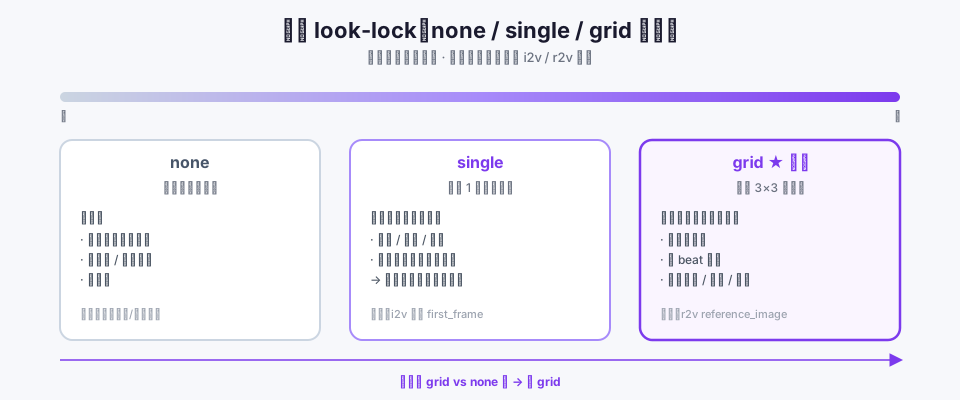
The original guidance framed grid as a rare exception "only for complex, self-contained, multi-step action arcs," so the agent that plans the shot breakdown almost never picked it — the grid was effectively dead weight. Web research made me realize the industry does the opposite: it treats the grid as the default, cost-saving, consistency-locking workhorse. We had its positioning backwards.
So I widened the guidance given to the agent (only the core of the grid / single / none criteria shown here):
PREFER "grid" as the default whenever the shot features one or more
characters, spans a multi-step action, or needs identity/outfit/scene
held consistent — a 3x3 nine-panel storyboard is composed first and drives
the whole clip. Use "single" for a shot that continues directly from the
previous one but REVEALS parts the previous frame did not show. Use "none"
only for a trivial shot with no character and no continuity concern.
When unsure between grid and none, choose grid.
The three tiers now divide cleanly:
- grid (default): has characters / multi-beat action / needs consistency — a nine-panel grid feeds the r2v general reference and the whole clip follows the nine cells.
- single: the shot continues directly from the previous one but reveals parts the previous frame didn't show (pull-back, turn, entrance) — compose one still as the i2v strict first-frame to cure continuation drift and stop the model inventing the un-shown parts.
- none: only for a trivial shot with no character and no continuity concern (a pure insert, an abstract texture, a title card).
The key property of the change is zero regression: the none branch behaves byte-for-byte as before, the three mode implementations are untouched — I only changed what the model is told to prefer. Widening the guidance doesn't touch the render chain; the blast radius is confined to the agent's selection bias, which is exactly the restraint prompt-layer tuning should have.
On the broader idea of handing video generation to an agent that emits structured definitions, I wrote about HyperFrames earlier — the through-line is the same: making the model emit the structure it's best at (HTML, or a grid) is more controllable than asking it to imagine the final pixels from scratch.
Conclusion
The nine-panel grid isn't a fancy new model — it's an engineering constraint so blunt it borders on a trick: use the physical fact that "nine cells share one canvas" to turn consistency from repeated nagging into a structural guarantee. For character-driven, action-dense passages that fit into nine beats, it's the most cost-effective consistency method available today. But it holds the person, not the scene; past nine beats, or with shots that vary too much, reach for something else.
One practical rule for anyone building an AI-video pipeline: make the grid the default, not the exception. Let single do what it's actually good at — patching continuation frames — and reserve none for trivial shots. When you're torn over whether to use a grid, the answer is usually: use it.
References
- ByteDance Seed — Official Launch of Seedance 2.0 (Feb 2026)
- AI-Indeed — When did Seedance 2.0 launch? Full timeline from beta to API
- Science and Technology Daily — ByteDance releases Seedance 2.0; Doubao and Dreamina integrate it (2026-02-12)
- closerAI (Zhihu) — NanoBananaPro grid storyboard + Sora 2 + Grok video generation
- Zhihu — Seedance 2.0: nine-panel grid + Seedance video generation method
- Zhihu — Four advanced ways to turn a nine-panel grid into video (with prompts)
- bilibili — Full workflow for AI video scene consistency: top-down view, grid, panorama, and GPT-image2 adjustments
- Atlas Cloud — The Ultimate Drama Workflow: GPT Image 2 + Seedance 2.0
- MindStudio — How to Use Storyboards and Character Sheets to Get Better AI Video Results
- SegmentFault — Seedance 2.5 launches: 30 seconds, 50 reference assets, native 4K (Jul 2026)