PowerPoint Skill Review — Teaching AI Agents to Make Slides That Don't Look Like AI Made Them
AI-generated PowerPoint slides have a tell. It's not the font (though it's usually Calibri). It's not the layout (though it's usually title + bullets). It's the uniform blandness — every slide looks like every other slide, and all of them look like they were made by someone who has never actually presented to a human audience.
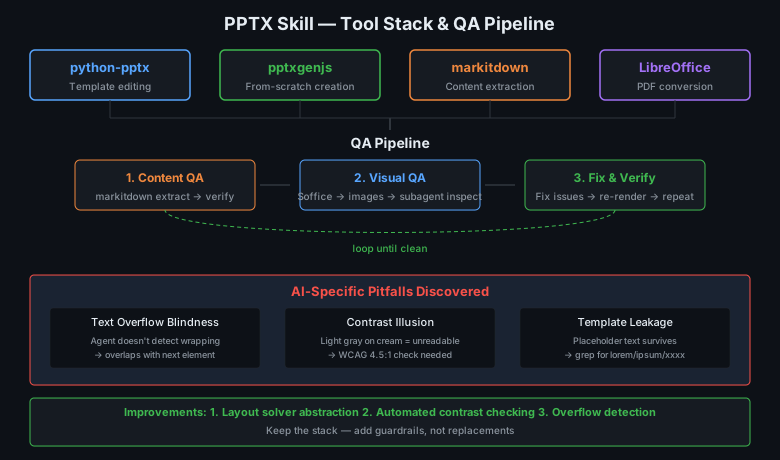
Our PowerPoint skill is supposed to avoid this. It combines python-pptx for template editing, pptxgenjs for from-scratch creation, markitdown for content extraction, and LibreOffice for rendering. The question is whether this stack is the right one — and whether newer tools have solved the "AI blandness" problem.
The Foundation: python-pptx (3,335 stars)
Scalanny/python-pptx is the undisputed king of programmatic PowerPoint in Python. It directly manipulates the Open XML format, which means you can do anything PowerPoint can do — if you're willing to write the XML.
The library is mature (10+ years), MIT-licensed, and covers 90% of what you'd want: slide creation, text formatting, image insertion, chart generation, table manipulation, and shape positioning. What it doesn't do well is layout — you position elements by absolute coordinates, which is precise but painful. A slide with three text boxes and an image requires manual x/y calculation for each element.
The AI agent problem: python-pptx gives you total control and zero guidance. The agent knows what content should go on the slide but has no help deciding where. Should the image go left or right? What's the right font size for a three-line title? These are design decisions that human presenters make subconsciously; AI agents need explicit rules.
Our skill handles this with a design guide — color palettes, typography pairings, spacing rules, and layout patterns. But this guide lives in the skill document, not in code. The agent reads it, interprets it, and then writes raw coordinates. It works, but it's fragile: a misinterpretation of "0.5 inch margin" becomes a text box clipped at the slide edge.
pptxgenjs and markitdown — The Supporting Cast
pptxgenjs (npm, 2,500+ stars) takes the opposite approach from python-pptx: layout-first, not content-first. You define slides with a fluent API that handles positioning automatically. It's great for programmatic creation but limited for template-based editing — if you need to start from a corporate template, you're back to python-pptx.
markitdown (Microsoft project) converts office documents to markdown. Running python -m markitdown deck.pptx gives you clean text extraction in seconds. It's the best tool in the stack for content review — before visual QA, you check that all the right words are in the right order.
The three tools complement each other well. python-pptx handles templates, pptxgenjs handles scratch creation, markitdown handles content verification. The stack is well-chosen.
What Our Skill Gets Right
The QA process is the killer feature. It mandates:
- Content QA — markitdown extraction to verify nothing's missing
- Visual QA — convert to images, inspect with a subagent (fresh eyes), find layout issues
- Fix-and-verify loop — fix problems, re-render, re-inspect until clean
This is the right approach for AI agents. The agent writes code that generates slides, then tests the output visually. If something's wrong — overlapping text, clipped margins, low contrast — it fixes the code and regenerates. The loop continues until a clean render.
The design principles are also well-thought-out: "never use accent lines under titles" (hallmark of AI slides), "dominance over equality" (one color should dominate), "dark sandwich" structure (dark background for title + conclusion, light for content). These are real design insights, not just "don't make ugly slides."
What's Missing: Layout Intelligence
The fundamental gap is that our skill treats layout as a manual process. The agent picks a layout pattern ("two-column," "icon + text rows," "large stat callout"), then writes coordinates. This works but doesn't scale — every new slide type requires the agent to re-solve the same layout problems.
What we need is not a new library but a layout solver — a thin abstraction that takes content and a layout preference, then computes coordinates:
layout = TwoColumnLayout(margin=0.5, gap=0.3)
layout.place_left(image, width=0.45)
layout.place_right(title, body, width=0.45)
# layout computes all x, y, width, height values
This isn't a complex problem — it's constraint-based positioning that a junior developer could implement in an afternoon. But it would eliminate the most common failure mode: manually calculated coordinates that are off by 0.2 inches.
External Alternatives: Nothing Revolutionary
We compared our stack against newer alternatives:
- Google Slides API — More structured than python-pptx but tied to Google Workspace. Not suitable for file-based workflows.
- Gamma.app — AI-native presentation builder. Beautiful output but no API, no programmatic control. Great for humans, useless for agents.
- Beautiful.ai — Similar to Gamma. AI design engine, no programmatic access.
- Slidev — Markdown-to-slides. Great for developer presentations but limited design control compared to python-pptx.
None of these solve the AI agent problem better than our existing stack. The AI-native tools (Gamma, Beautiful.ai) produce better-looking slides but aren't controllable. The developer tools (Slidev) are controllable but produce less polished output. Our stack sits in the middle — controllable and capable, but requiring the agent to make design decisions.
AI-Specific Pitfalls We Discovered
Testing the skill against real content revealed three failure modes that are specific to AI agents:
Text overflow blindness. The agent writes a title, python-pptx places it in a text box of the right width, and the text wraps to two lines. But the agent calculated spacing assuming one line. The second line now overlaps with the subtitle below. Human designers see this immediately; AI agents don't know to check.
Contrast illusion. Light gray text on a cream background looks fine in code (both are "light") but is unreadable on a projector. The agent can't perceive contrast; it needs explicit rules ("text color must have at least 4.5:1 contrast ratio against background").
Template leakage. When editing an existing template, the agent sometimes leaves placeholder text from the original slide. The markitdown QA step catches this, but it shouldn't be a problem in the first place.
Improvement Path
Three changes would substantially improve this skill:
-
Add a layout solver abstraction. Thin wrapper classes (TwoColumnLayout, GridLayout, HeroLayout) that compute coordinates from content + preferences. This eliminates manual coordinate calculation and its associated bugs.
-
Add automated contrast checking. Before rendering, validate text/background contrast ratios. Flag anything below WCAG AA (4.5:1 for normal text, 3:1 for large text). This prevents the invisible-text-on-projector failure mode.
-
Add overflow detection. After rendering to images, scan for text that extends beyond its container bounds. This can be done with OCR or by comparing expected text length against box dimensions.
Verdict
Keep the stack. python-pptx + pptxgenjs + markitdown is the right foundation for AI agent PowerPoint creation. The skill's design principles and QA process are genuinely good. What's missing is layout intelligence — the kind of positioning logic that human designers apply without thinking.
Add the layout solver, contrast checking, and overflow detection as thin utility layers. These aren't replacements for the existing stack; they're guardrails that prevent the stack's most common failure modes.
The goal isn't to make AI agents into great slide designers. It's to make them reliable enough that the output doesn't need human rescue.