There's a new category of developer tool emerging: skills for AI coding agents. With Claude Code, OpenClaw, Codex, and Hermes Agent all supporting installable skill packs, the attack surface is growing fast. A malicious skill can read your files, exfiltrate API keys, or inject prompt-level exploits — all from a simple clawhub install.
Enter skill-vetter — a "multi-scanner security gate" from app-incubator-xyz that promises to detect malicious code, vulnerabilities, and suspicious patterns before you install a skill. It has 26 stars, 6 forks, and a bold claim: four scanners working together to block dangerous skills.
I spent an afternoon tearing it apart. Here's what I found.
What It Claims to Do
skill-vetter runs four scanners against a skill before installation:
| Scanner | Claims to Detect |
|---|---|
| aguara | Prompt injection, obfuscation, suspicious LLM calls |
| skill-analyzer | Known malicious patterns, CVE database (Cisco) |
| secrets-scan | Hardcoded API keys, tokens, credentials |
| structure-check | Missing SKILL.md, malformed YAML, dangerous shell commands |
Outputs a verdict: SAFE, REVIEW NEEDED, or BLOCKED.
Sounds solid, right?
The Reality: Dead Scanners on Arrival
Here's the first problem. On a clean macOS machine — no Go toolchain, no Cisco Python package — here's what happens when you run the dependency check:
✅ python3
✅ curl
✅ jq
✅ git
❌ aguara — NOT INSTALLED
❌ skill-scanner — NOT INSTALLED
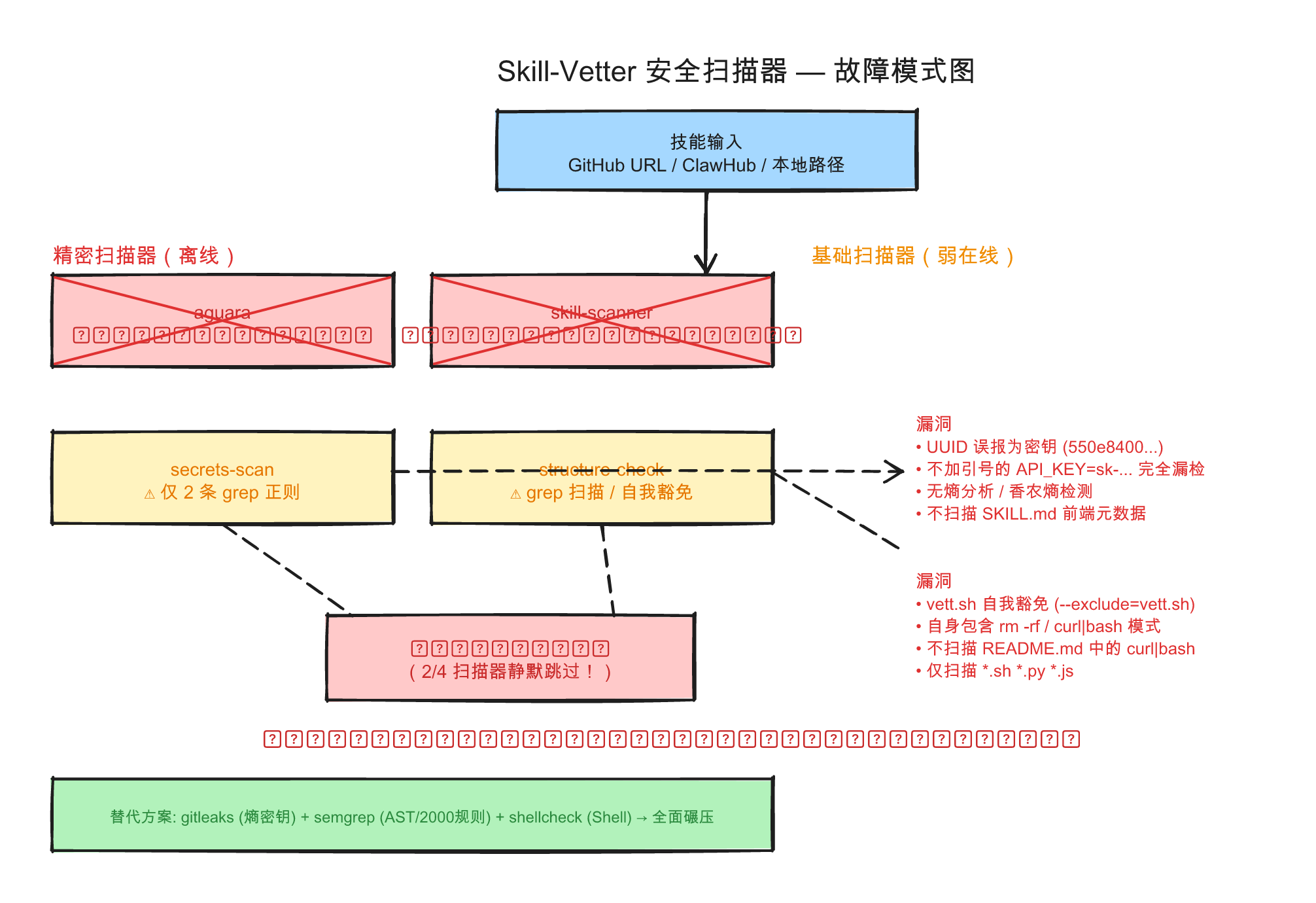
That's 50% of the detection surface offline. The two most sophisticated scanners — aguara (prompt injection) and skill-scanner (CVE database) — require separate, non-trivial installations (go install, pip install). The install script doesn't even attempt to install them. It just notes them as "skipped."
Without these, skill-vetter still runs. It still outputs verdicts. It still says "✅ SAFE" or "🚫 BLOCKED." But only the two weakest scanners are working: grep-based regexes for secrets and shell commands.
The Scanner That Can't Scan Itself
The most revealing bug is in vett.sh, the main scanning script. Line 17 of the structure-check scanner reads:
grep -rqE "(rm -rf|curl.*\|.*bash|...) ..." "$SKILL_DIR" --exclude="vett.sh"
Notice the --exclude="vett.sh"? That's not a coincidence. vett.sh contains the exact patterns it flags as dangerous — specifically, rm -rf "$TMPDIR_BASE" on line 17 for cleanup. Without that self-exemption, skill-vetter would block itself.
The README's own one-line install command is bash <(curl -s https://...) — a curl|bash pattern that's one of the tool's danger signals. The tool doesn't scan README.md (only *.sh, *.py, *.js), so it never catches itself.
This is the tooling equivalent of a security guard who doesn't pass their own background check and quietly exempts themself from the rules.
Regex Roulette: The Secrets Scanner
The secrets scanner uses exactly two grep regexes. Let me show you what they catch — and what they miss.
Caught (true positive):
api_key="sk-abcdefghijklmnop123456" # ✅ Detected
Missed (false negative):
API_KEY=sk-1234567890123456789 # ❌ Not detected — regex requires quotes
False positive (a UUID):
apikey="550e8400-e29b-41d4-a716-446655440000" # ❌ Flagged as a secret
Missed entirely:
subprocess.run(["rm", "-rf", "/"]) # Not detected — regex expects contiguous "rm -rf"
This is signature-based detection at its crudest. No entropy analysis. No AST parsing. No taint tracking. Real secret scanners like gitleaks and truffleHog use Shannon entropy — skill-vetter uses two regular expressions.
Multi-Dimensional Scorecard
| Dimension | Score | Why |
|---|---|---|
| Security effectiveness | 4/10 | Signature-only, grep-level, trivially bypassable |
| Code quality | 5/10 | Decent bash hygiene but self-exemptions and fragile error handling |
| Dependency health | 3/10 | 50% scanners dead on arrival; install script doesn't help |
| False positives/negatives | 3/10 | UUIDs flagged as secrets; unquoted keys invisible |
| Uniqueness | 6/10 | First-mover in a real niche — but first doesn't mean good |
| Maintenance signals | 2/10 | 2 commits, 0 updates in 60 days, no license file |
| Fit for my stack | 3/10 | Only detects Claude Code / OpenClaw; no Hermes support |
| Weighted average | ~3.6/10 |
The Irony: A Pipeline That Outperforms It
Want real security scanning for agent skills? A three-tool pipeline of existing, battle-tested tools beats skill-vetter on every dimension:
# Real secret detection (entropy-based, 100+ rules)
gitleaks detect --source <skill-dir>

# Real code analysis (AST-aware, 2000+ rules, taint tracking)
semgrep --config auto <skill-dir>

# Real shell script analysis (catches actual bugs)
shellcheck <skill-dir>/scripts/*.sh
These tools have thousands of contributors, millions of downloads, and are maintained by organizations with security teams. skill-vetter has 2 commits from a single author who hasn't touched the repo in two months.
What Would It Take to Fix?
If someone wanted to turn skill-vetter into a real tool:
- Drop the self-exemption. If your security tool can't pass its own checks, fix the checks — don't add exclusions.
- Add entropy-based secret detection. Two regexes is not a scanner.
- Bundle the dependencies. If aguara and skill-scanner are required, install them automatically or warn explicitly that the scan is degraded.
- Add a license file. README says MIT, repo has no LICENSE — legally ambiguous.
- Support more agent platforms. Hermes, Codex, Cursor — not just Claude Code and OpenClaw.
Verdict: Security Theater
skill-vetter is a well-intentioned prototype that creates more problems than it solves. The output format looks authoritative — green checkmarks, severity levels, a final verdict — but the underlying detection is grep with a pretty face.
The danger isn't that skill-vetter is useless. It's that it creates a false sense of security. A user sees "✅ SAFE — All scanners passed" and installs a skill, not realizing that half the scanners never ran and the other half can be bypassed with basic obfuscation.
For now, the best skill-vetting tool is still the oldest one: read the SKILL.md, check the source repo, and ask yourself: do I trust this author with access to my filesystem?
Final verdict: SKIP installation. Use gitleaks + semgrep + shellcheck instead.