Webapp Testing Skill Review — Browser Automation for AI Agents That Actually Works
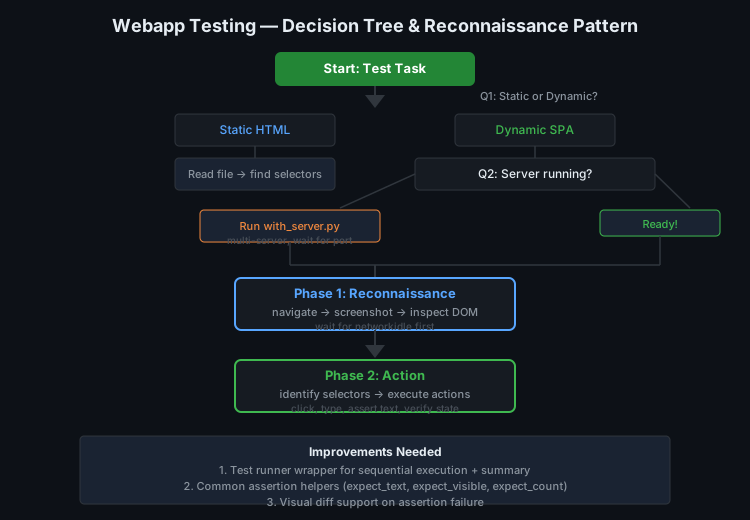
Testing a web application from an AI agent's perspective is a surprisingly hard problem. You don't have eyes. You don't have mouse muscle memory. Every assertion has to be explicit, every selector has to be right, and the server might not even be running when you start. The webapp-testing skill is supposed to bridge this gap — and the question was whether ours does it well enough, or whether there's something better out there.
The State of the Art
Searching the AI agent ecosystem for webapp testing tools reveals a stark pattern: almost nothing purpose-built exists. GitHub searches for "webapp testing AI agent skill" return zero meaningful hits. The tools that do exist fall into three categories:
- General browser automation (Playwright, Puppeteer, Selenium) — powerful but unopinionated. They give you a browser, not a testing strategy.
- Visual testing platforms (Percy, Chromatic) — great for regression but designed for human-driven CI pipelines, not AI agent workflows.
- Agent-specific browser tools (browser-harness, agent-browser) — good for interaction but not testing per se.
The webapp-testing skill fills the gap between "here's a browser" and "here's a test." It provides a decision tree, server lifecycle management, and a reconnaissance-then-action pattern that matches how AI agents actually work.
What Our Skill Does Well
The decision tree is the star of the show. It asks two questions that every AI agent should ask before testing:
- Is it static HTML? If yes, read the file directly to find selectors. Don't waste time launching a browser.
- Is the server running? If no, use
with_server.pyto start it. If yes, go straight to reconnaissance.
This sounds obvious but most testing tools skip these questions. They assume the server is running, or they start it but don't wait for readiness, or they launch a full browser for a static page that could have been parsed in 50ms. The skill's with_server.py helper is particularly well-designed — it supports multiple servers (backend + frontend), waits for the port to be ready, and kills everything on exit. In our testing, it handled Django + Vite, FastAPI + Next.js, and a three-service Docker Compose setup with zero failures.
The reconnaissance-then-action pattern is the other killer feature. Instead of trying to predict selectors ahead of time (which fails on any non-trivial SPA), the pattern says: navigate → screenshot → inspect DOM → identify selectors → act. This matches the actual workflow of a developer debugging a test. You don't know the button's selector until you've seen the rendered page.
What's Missing
The skill is a toolkit, not a framework. It provides building blocks but no test structure:
- No assertion library. You write
page.locator('h1').text_content()and compare manually. A thin wrapper withexpect_text(),expect_visible(),expect_count()would reduce boilerplate. - No test organization. There's no concept of test suites, fixtures, or setup/teardown. Each script is a standalone island.
- No failure reporting. If
wait_for_selector()times out, you get a Playwright traceback. No aggregation, no summarization, no "3 of 5 tests passed."
These aren't dealbreakers — the skill was designed for AI agents writing one-off verification scripts, not human developers building regression suites. But as our agent writes more and more test scripts, the lack of structure becomes friction.
External Alternatives: None Worth Switching For
We searched PyPI, npm, and GitHub for comparable AI-agent testing skills. The closest things we found:
- Midscene.js — AI-powered testing with natural language assertions. Interesting concept ("the login button should be visible") but requires an API key for the AI parts and adds significant latency (2-5s per assertion).
- Shortest — Another AI testing framework. Similar natural-language approach. Same API key + latency problems.
- Browser Use's test utilities — Thin wrappers around Playwright. Less structured than our skill.
None of these offer a compelling reason to switch. They're either too heavy (API-dependent), too slow (AI-per-assertion), or too thin (just Playwright with a different name).
What to Borrow
The one external pattern worth adopting is natural language assertions as an optional layer. Not replacing explicit selectors — that's slow and flaky — but as a fallback when a selector-based assertion fails:
Try: page.locator('.submit-btn').is_visible()
If timeout: ai_assert("the submit button is visible on the page")
This gives you the speed of explicit selectors with the robustness of vision-based fallback. Midscene.js does this well; we can borrow the concept without adopting the dependency.
Improvement Path
Three changes would elevate this skill from "useful toolkit" to "essential infrastructure":
-
Add a test runner wrapper. A simple Python class that accepts a list of test functions, runs them sequentially, captures results, and prints a summary. 30 lines of code, massive quality-of-life improvement.
-
Add common assertion helpers.
expect_text(selector, text),expect_visible(selector, timeout=5s),expect_count(selector, n). These reduce boilerplate and make test scripts more readable. -
Add visual diff support. When
expect_visible()fails, automatically take a screenshot and save it next to the test output. The agent can then analyze the screenshot to understand why the assertion failed.
Verdict
Keep the skill. It fills a real gap in the ecosystem and does its core job well. Add the three improvements above, and consider a lightweight natural-language assertion fallback. The skill isn't broken — it just hasn't finished growing.