FFmpeg Chromakey Green Screen Compositing: The 1×1 Pixel Bug and Alpha Portability Fix
FFmpeg Chromakey Green Screen Compositing: The 1×1 Pixel Bug
In video processing, FFmpeg's chromakey filter is the classic green screen removal tool — an order of magnitude faster than AI segmentation, and perfectly serviceable when the backdrop is clean. But in July 2026, the green_screen_processor tool in OpenMontage, the open-source agentic video production system, hit a remarkably subtle bug: when users selected the chromakey method, the output wasn't a composited video — it was a solid block of color with the subject completely gone.
More bizarrely, the FFmpeg command itself didn't error. It exited cleanly with return code 0 and produced a valid file. You just got a completely wrong video.
The root cause wasn't an FFmpeg defect. It was a misunderstanding of one implicit behavior in the overlay filter — and the fact that scale=iw:ih becomes a no-op under specific conditions. The fix spans two separate commits, and the second commit's alpha format portability issue is arguably more interesting than the first bug.
Bug #1: The 1×1 Pixel Background
The Problematic Code
OpenMontage's _process_chromakey method generated the compositing background for each frame like this (simplified):
# Old code — buggy
ffmpeg -y \
  -f lavfi -i "color=c=#0E172A:size=1x1"  \    # ← 1×1 solid color background
  -i frame_0000.png \                           # ← green screen frame (subject on green)
  -filter_complex \
    "[0:v]scale=iw:ih[bg];\                     # ← attempt to scale to frame size
     [1:v]chromakey=color=0x00FF00:\
       similarity=0.3:blend=0.08[fg];\          # ← key out green
     [bg][fg]overlay=0:0" \                      # ← composite
  -frames:v 1 output.png
The logic looks sound: generate a 1×1 solid color background, use scale=iw:ih to resize it to the frame dimensions, then overlay the keyed foreground on top.
Except it produced a solid color file.
Layer-by-Layer Breakdown
The problem traces back to how FFmpeg evaluates filter_complex chains. In this filtergraph:
Layer 1: scale=iw:ih is a no-op.
iw and ih are the width and height of the input stream. [0:v] is the color=size=1x1 source, so iw=1, ih=1. scale=1:1 does nothing. The developer's intent was clearly "scale to the frame's dimensions," but iw/ih reference the same input — there's no cross-reference to the other stream. The background stays 1×1.
Layer 2: overlay takes the size of its first input.
This is the core semantic of FFmpeg's overlay filter, and the most lethal part of this bug. The output size of overlay = the size of its first input (bottom layer). The [bg] label feeds in that 1×1 background — so the entire composited result is 1×1 pixel.
Layer 3: _reconstruct_video upscales the 1×1.
OpenMontage processes frames individually — each frame becomes a PNG, then they're stitched back into a video. The _reconstruct_video encoder encounters 1×1 inputs and scales them up (FFmpeg default behavior), so the final video isn't 1×1 — it's upscaled to the target resolution. But the content is just that single solid-color pixel, stretched.
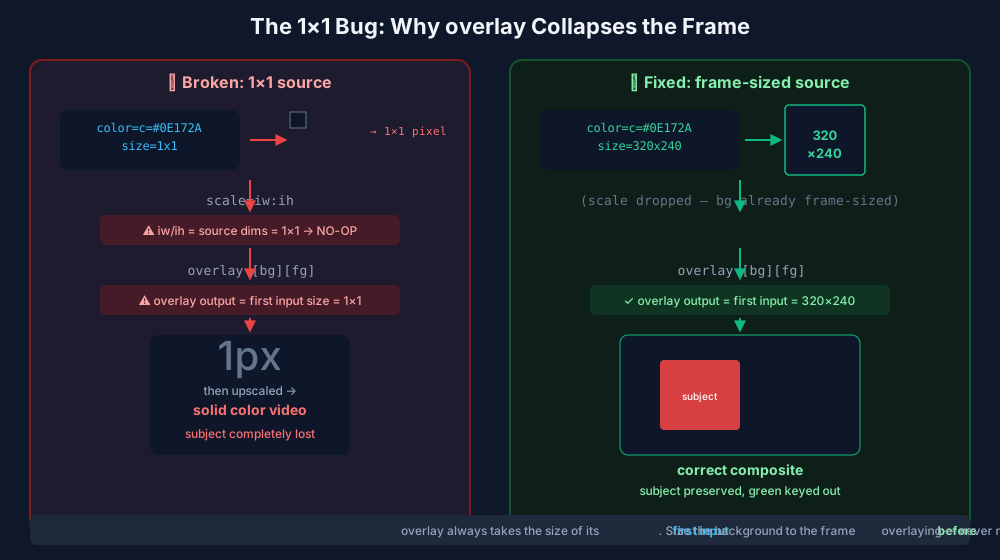
Why no error? Because every step is a valid operation. A 1×1 PNG is a legitimate file. FFmpeg processes it normally. The fallback logic never triggers because the primary command exits successfully with code 0. This is silent data loss — every call with method="chromakey", and every call with method="auto" that selects chromakey, produces wrong results.
The Fix
The first commit (df8cf21) initially used scale2ref to reference the frame dimensions. But the second commit (fa756fb) rewrote the approach with something more direct — sizing the background to the frame at generation time:
# Fixed code
ffmpeg -y \
  -f lavfi -i "color=c=#0E172A:size=320x240" \  # ← background sized to frame directly
  -i frame_0000.png \
  -filter_complex \
    "[1:v]chromakey=color=0x00FF00:\
       similarity=0.3:blend=0.08,\
     format=yuva420p[fg];\                       # ← force alpha format (see below)
     [0:v][fg]overlay=0:0:format=auto,\
     format=yuv420p" \                            # ← flatten output to yuv420p
  -frames:v 1 output.png
The scale filter is gone entirely. The background layer is the correct size from the start, overlay takes the first input's size (now 320×240), and the output is correct. The _process_chromakey method signature also gained width and height parameters, fed from _probe_video's detected frame dimensions.
Bug #2: Alpha Format Portability
After the first fix landed, local tests passed — on macOS and Windows. But CI runs on Linux, and the E2E test still failed: corner pixels were green instead of the expected background color (#0E172A).
The Symptom
The chromakey filter works by marking pixels matching the target color (here, green 0x00FF00) as transparent, while preserving all other pixels. This requires the frame to have an alpha channel (transparency channel).
The problem: different FFmpeg builds handle the pixel format negotiation of chromakey output differently.
- macOS (Homebrew) and Windows builds typically preserve the alpha channel automatically
- The CI Linux build dropped the alpha plane during filter chain propagation
Without the alpha plane, overlay treats the foreground as fully opaque — so it paints the entire green screen frame over the background with no compositing. The keyed green doesn't become transparent; it covers everything.
The Fix: Explicit yuva420p
# Force alpha format immediately after chromakey
[1:v]chromakey=color=0x00FF00:similarity=0.3:blend=0.08,format=yuva420p[fg]
The a in yuva420p stands for alpha. Forcing this format means that no matter how FFmpeg infers formats during filter negotiation, the transparency produced by chromakey is always preserved in an explicit alpha plane.
After compositing, the output is flattened back to a standard opaque format with format=yuv420p (PNG output and final video encoding typically don't need alpha):
[0:v][fg]overlay=0:0:format=auto,format=yuv420p
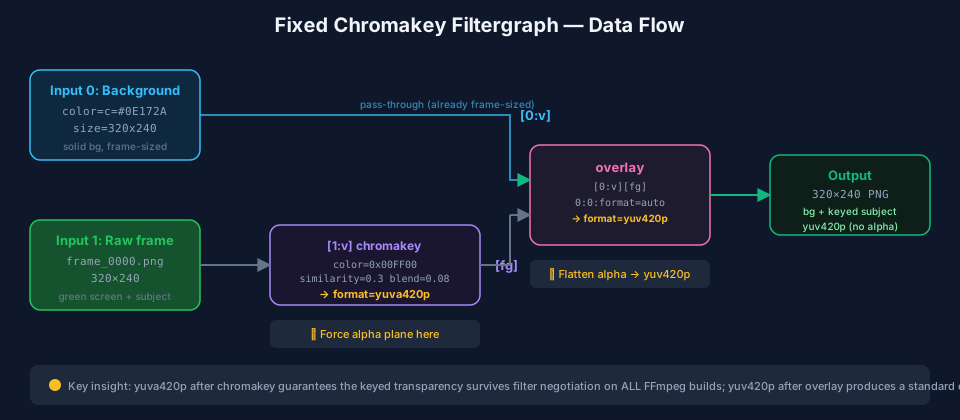
Why Alpha Loss Happens
FFmpeg's filter chain has an auto-negotiation mechanism for pixel formats. When two filters connect, FFmpeg automatically selects a compatible pixel format based on the downstream filter's input constraints. When chromakey outputs a format with alpha (like yuva420p) and passes it to overlay, if the overlay's build configuration or compile options don't permit alpha inputs, FFmpeg silently strips the alpha plane.
This isn't a bug — it's a trade-off FFmpeg makes to keep different filter combinations compatible. But it means: you cannot assume chromakey's output format is the same on all platforms.
Before and After: Complete Comparison
| Dimension | Old Code (Buggy) | Fixed |
|---|---|---|
| Background source size | color=c=#0E172A:size=1x1 |
color=c=#0E172A:size=WxH |
| Scaling strategy | scale=iw:ih (no-op) |
No scaling needed (generated at frame size) |
| Overlay output size | 1×1 (first input's size) | W×H (first input's size) |
| Alpha format | Relies on auto-negotiation (unreliable) | Explicit format=yuva420p |
| Output format | Unspecified (may carry alpha) | Explicit format=yuv420p |
| Cross-platform consistency | Passes macOS/Windows, fails Linux | Consistent across all platforms |
| Subject preserved | ❌ Completely lost | ✅ Properly composited |
The complete fixed FFmpeg filtergraph:
ffmpeg -y \
  -f lavfi -i "color=c=0x0E172A:size=320x240" \
  -i frame_0000.png \
  -filter_complex \
    "[1:v]chromakey=color=0x00FF00:similarity=0.3:blend=0.08,format=yuva420p[fg]; \
     [0:v][fg]overlay=0:0:format=auto,format=yuv420p" \
  -frames:v 1 output.png
Testing: How to Catch Silent Failures
This bug was hard to catch because it never errors — FFmpeg exits gracefully and produces a valid file. OpenMontage's fix introduced regression tests (test_green_screen_chromakey.py, 116 lines) with two layers of defense:
Unit test (offline, no real FFmpeg processing) — validates the filtergraph string construction logic:
def test_chromakey_filter_scales_background_to_frame():
    # mock run_command, capture the built command
    tool._process_chromakey(fd, pd, "#0E172A", 1, 320, 240)

    cmd = ffmpeg_cmds[0]
    fc = cmd[cmd.index("-filter_complex") + 1]

    # Background must be sized to frame, not the old 1×1
    assert "size=320x240" in " ".join(cmd)
    assert "size=1x1" not in " ".join(cmd)
    assert "[0:v]scale=iw:ih[bg]" not in fc   # no more no-op scale
    assert "format=yuva420p" in fc             # alpha must be forced
E2E test (requires ffmpeg + ffprobe) — validates actual pixels, the key to catching silent failures:
def test_chromakey_preserves_frame_size_and_keys(tmp_path):
    # Generate a 320×240 green frame with a red subject
    # ... process it ...
    ok = GreenScreenProcessor()._process_chromakey(
        frames_dir, processed_dir, "#0E172A", 1, 320, 240
    )
    assert _size(out) == (320, 240)  # size must not collapse

    center = _pixel(out, 160, 120)   # red subject → stays red
    corner = _pixel(out, 10, 10)     # was green → keyed to background
    assert center[0] > 150 and center[1] < 80      # subject not lost
    assert corner[0] < 60 and corner[1] < 60        # green keyed out
The _pixel assertions are critical: they check actual pixel color values at specific coordinates. If alpha loss caused overlay to paint opaque green, the corner pixel would stay green — and this assertion would fail. It was exactly this E2E test going red in CI's Linux environment that exposed the alpha portability issue.
Why AI Video Pipelines Need to Care About These Low-Level Details
OpenMontage is designed as an agent-driven video production system — we analyzed its architecture before: 52 tools, 500+ agent skills, fully automated from research and scripting to editing and compositing. green_screen_processor is one of those 52 tools.
The architectural assumption of such systems is: the tool layer is reliable. The upper-layer agent decides "this segment needs green screen keying," calls green_screen_processor, and takes the result to continue downstream steps — music, subtitles, transitions. If the tool layer silently returns wrong results (a solid-color video), the agent doesn't know — it just continues processing, eventually producing a finished video that suddenly turns solid color in one segment.
This problem is amplified several orders of magnitude in AI video pipelines:
- AI agents can't perceive visual errors. Unlike unit tests, agents don't check pixel values frame by frame. If chromakey outputs solid color, the agent sees a "successfully generated video file" and moves on.
- The debugging chain is extremely long. From agent calling the tool to the final video product, there may be 5-10 processing steps in between. A solid-color video is far harder to detect and locate mid-pipeline than in traditional pipelines.
- FFmpeg's silent failure mode. FFmpeg's design philosophy is "best effort" — even with implicit input problems, it tries to generate output rather than erroring. This is a virtue in interactive use, but a ticking time bomb in automated pipelines.
This is exactly the point we emphasized when discussing AI agent testing strategies: the tool layer of AI agents must have pixel-level assertions, not just "did it produce an output file" checks. OpenMontage's _pixel() test — checking RGB values at specific coordinates — is the right approach.
Zooming out to the broader landscape: AI video generation tools have proliferated in 2026, but classic video processing techniques like green screen compositing remain indispensable parts of the pipeline. Understanding FFmpeg's low-level behavior — overlay's sizing rules, filter negotiation's format propagation, differences between builds — isn't optional in AI-driven automated pipelines. It's mandatory.
Conclusion
These two bugs teach us three things:
overlay's output size = its first input's size. This isn't a prominently documented "gotcha" — it's an implicit behavior. Always ensure your bottom layer is the correct size. Best to set it at generation time, not rely on post-scaling.scale=iw:ihreferences the current input, not other inputs. If you need to reference another stream's dimensions, usescale2refor parameterize the dimensions upfront.- Always declare pixel formats explicitly; never rely on auto-negotiation.
format=yuva420pafter chromakey,format=yuv420pafter overlay — this makes the filtergraph behave consistently across all FFmpeg builds.
The last point might be the most valuable lesson: silent failures are more dangerous than crashes. A crash you notice immediately; a silent failure carries wrong data through the entire pipeline, only surfacing when the final product ships. Pixel-level assertions — checking output file dimensions and specific coordinate color values — are the only reliable way to catch these issues.
References
- OpenMontage — green_screen_processor.py — Full source after fix
- Commit
df8cf21— fix(green_screen): scale chromakey background to frame size, not 1x1 - Commit
fa756fb— fix(green_screen): make chromakey compositing portable across FFmpeg builds - FFmpeg — overlay filter documentation — "The output video size is the same as the input video size of the first (bottom) input"
- FFmpeg — chromakey filter documentation — Pixel format and alpha behavior
- FFmpeg — scale2ref filter documentation — Scaling with reference to another stream's dimensions
- OpenMontage — test_green_screen_chromakey.py — Regression tests (116 lines)