White Models, First-Last Frames, References, V2V: What Six AI Video Control Techniques Actually Cost You
Anyone who has produced a multi-shot video with AI has hit the same moment. You write "camera orbits the subject 180 degrees from a low angle," and the model gives you roughly that — except the focal length drifted, the subject's scale in frame changed, and the pillar in the background evaporated halfway through the arc. You reroll. This time the pillar stays, but the orbit runs the wrong way.
That is not a prompting failure. It is the fact that language was never a high-bandwidth channel for describing space. A sentence can constrain "roughly how it moves." It cannot constrain "where the camera is, frame by frame."
2026 gave this a clear inflection point. On July 31, ByteDance's Seedance 2.5 went live (first shown at Volcano Engine's FORCE conference on June 23). Per hands-on reports from Jimeng's closed beta, the most counterintuitive capability in the release is not the 30-second single-shot output or the native 4K — it is that you can upload a 3D white model and its camera animation directly, imported through an official Blender plugin. Camera, blocking, and occlusion go to the 3D software; material, lighting, and detail go to the model. Volcano Engine opened the Seedance 2.5 API on August 7.
The white-model route itself is not new — the ComfyUI crowd has been exporting Depth/Normal passes out of Blender into ControlNet for over two years. What is new is that it graduated from community hack to first-class product feature. Which makes it worth putting on the same table as the other mainstream techniques and comparing honestly.
First, the axes: why these four dimensions
Most technique comparisons rank tools by "which is better." That is meaningless — they don't lock the same thing. I use four dimensions, because these four are the ones you actually pay for at selection time:
- Which dimension does it lock — time anchors, spatial geometry, identity and appearance, or style and lighting. This determines whether it solves the problem in front of you. Everything else is secondary.
- Up-front cost — how much human effort before generation, and whether it demands a skill you don't have (3D, most often).
- Iteration cost — how much has to be redone per change. Badly underrated: a technique that is expensive up front but cheap to revise routinely beats one that is cheap up front but requires a full reroll for every note.
- Failure mode — how it breaks. Everything breaks. The difference is whether it breaks predictably. Predictable failure can be gated in a pipeline; unpredictable failure can only be caught by a human watching every frame.
The fourth is the one I think belongs in every selection doc and almost never appears in one.
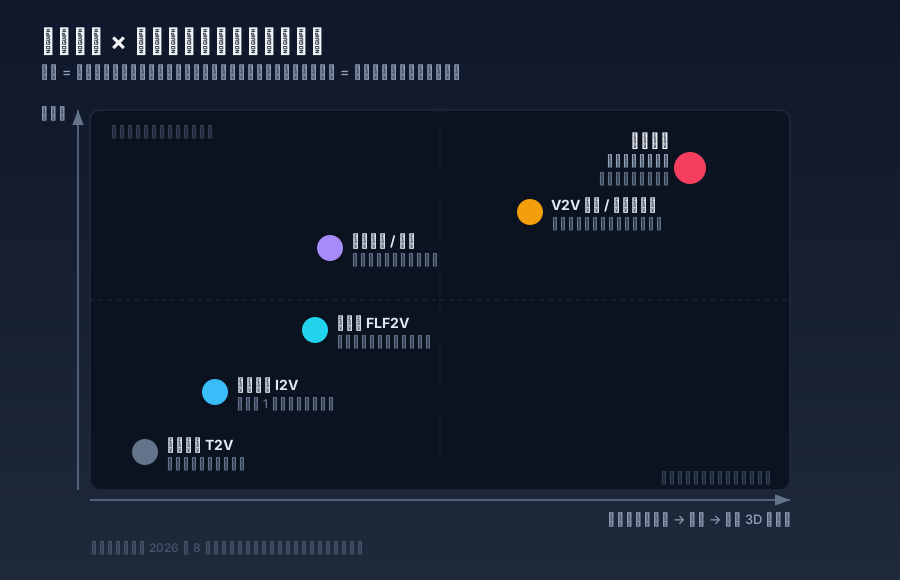
The six techniques
1. Pure prompting (T2V): locks style only
Locks: style, subject matter, general mood. No geometric dimension at all.
Honestly it has exactly two advantages: zero up-front cost, and it is the correct choice during exploration — when you don't yet know what you want, precise control is wasted effort.
Its reproducibility is near zero. Run the same prompt twice and you get two different shots, not two versions of the same shot. Irrelevant for creative sampling, fatal for delivery: when a client says "slow down that transition at 0:03," you have no handle that touches only that.
Failure mode: unpredictable. Anything can change.
2. Image-to-video (I2V): locks the first frame
Locks: everything in the opening frame — composition, character appearance, palette, key light.
This is the most-used technique in production, for a simple reason: image models are far more controllable than video models. You iterate in the image stage until it's right, at roughly one percent of video cost, then ask the video model to do one job — make it move. Essentially every keyframe-driven workflow in 2026 rests on this asymmetry.
Control decays fast after frame one. The longer the shot, the more the back half free-falls. Under five seconds is usually fine; past ten you watch the image drift away from the frame you carefully tuned.
Failure mode: predictable — it always degrades from the back. Which is exactly why cutting shorter shots mitigates most of it, and why this technique is so much easier to run in production than pure prompting.
3. First-last frame (FLF2V): locks two time anchors
Locks: the shot's start state and end state. The model interpolates the path.
Luma's Dream Machine keyframes productized this early. Alibaba's Tongyi Lab open-sourced Wan2.1-FLF2V-14B-720P under Apache 2.0 on April 17, 2025 — two images in, roughly five seconds of 720p out — which made the route free for everyone.
Its real value is not generation, it is editing. First-last frame lets you nail cut points: the outgoing shot's last frame is the incoming shot's first frame, so the transition connects by construction. That is its irreplaceable position in a pipeline — it is not for making hero shots, it is for stitching them.
The middle is entirely uncontrolled. Give it A and B and it may take a path you never imagined. The bigger the gap, the wilder the path: standing to sitting is fine; day to night frequently produces an incoherent morph.
Failure mode: predictable — the more the endpoints resemble each other, the safer the interpolation. That rule is stable enough to encode as a hard pipeline constraint.
4. Multi-reference / elements (R2V): locks identity and appearance
Locks: face, wardrobe, props, the visual DNA of a set. Nothing about motion or space.
This is the current workhorse against character drift. Per hands-on reporting, Seedance 2.5 accepts up to 50 multimodal reference assets (roughly 30 images, 10 video clips, 10 audio clips). That order of magnitude signals the trend: a reference is no longer an image, it is an asset library.
I've written two pieces dissecting this route — the industry paradigm for character consistency and how it lands in engineering on separating identity from wardrobe before locking either, and why the nine-panel grid became the consistency workhorse on the near-cheat of painting nine keyframes onto one canvas so the canvas itself enforces consistency.
The fundamental limit: it locks what things look like, not where they are. The face stays right, but the character's position in frame, the occlusion relationship with the background, and how the camera arcs around them are all outside its reach. Which is precisely the half a white model covers.
Failure mode: predictable — angles the reference set doesn't cover (front-only references, then a shot from behind). Gate it in the pipeline with a VLM identity check.
5. Video-to-video restyle / in-context edit: inherits all motion
Locks: the source clip's entire temporal structure — motion, duration, pacing, cuts.
When Runway shipped Aleph on July 25, 2025, it framed the route precisely: in-context video editing — change what you asked for, keep everything else. Aleph 2.0 and Edit Studio, May 21, 2026, pushed it to 30 seconds at 1080p and — the part that matters most operationally — applies one edit across multiple cuts instead of forcing you to work shot by shot. The open-source counterpart is Alibaba's VACE (arXiv:2503.07598, ICCV 2025; ~3.9k stars as of August 2026), which unifies R2V, V2V, and masked V2V in one framework, with 1.3B and 14B production models released May 14, 2025.
The advantage is enormous: temporal consistency is free, because the motion isn't generated, it's inherited. So is physical plausibility — real footage carries correct physics for nothing.
The cost is equally enormous: you need a source clip first. That is not a technical limit, it is a precondition. Either you shoot it (then AI is post), or you render it in 3D (then you're back to white models), or you generate it with other AI (and inherit every one of that clip's defects).
Its right place in a pipeline is not primary generation but the repair layer: swap a prop, change the weather, unify the grade, paint out a continuity error. Touching only the broken part is an order of magnitude cheaper than rerolling the shot.
Failure mode: predictable — restyling cannot invent information the source lacks. If the subject faces away in the plate, you will not restyle their face into view.
6. White-model control: locks space and camera
Locks: camera position, focal length, dolly path, timeline, spatial relationships and occlusion. Material, lighting, and detail all go to the model.
Two workflows exist. The classic ComfyUI route: block the scene in Blender, export Depth / Normal / Canny / OpenPose control passes, feed ControlNet or VACE. The productized route, live since July 2026 with Seedance 2.5: upload the 3D white model and camera animation through the official Blender plugin and let the model consume it natively.
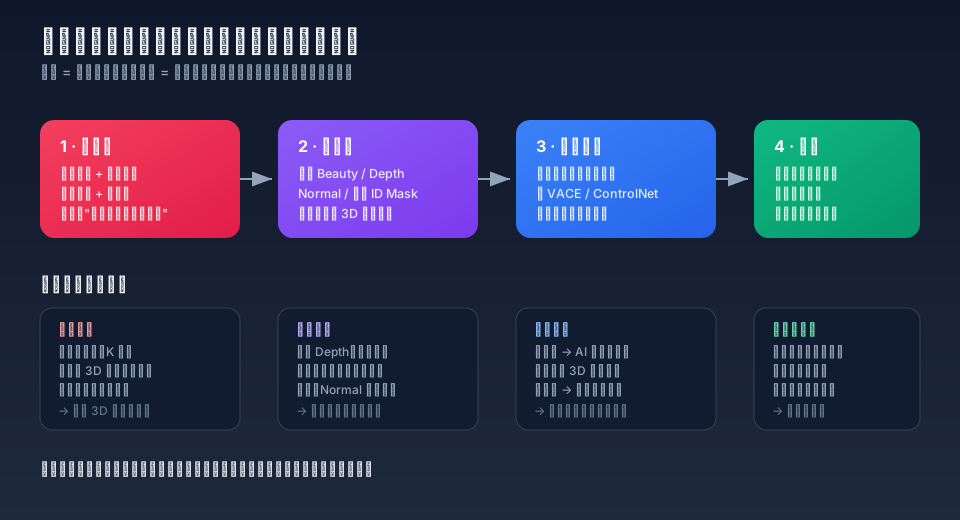
Advantages:
- The camera move is a real camera move. Focal length, dolly, depth of field, fly-throughs are all determined in 3D — reproducible and tweakable. Changing one parameter changes one parameter; it isn't another pull of the slot machine.
- Temporal consistency is enforced by geometry. Occlusion, perspective, and relative scale do not drift frame to frame. This is the hardest problem in pure text-to-video, and the white model sidesteps it by cheating: don't make the model infer space, hand it the space.
- Cross-shot consistency comes free. Move the camera within the same set and spatial relationships line up automatically — far more reliable than aligning with reference images. I covered the awkwardness of locking sets with reference images in the piece on scene consistency; the white model is basically the root-cause fix for most of that awkwardness.
- Reviewable and collaborative. A director can lock the cut and the pacing at the blockout stage and sign off before a single frame is generated. In commercial work this one line may be worth more than every technical advantage above combined — it converts AI video from "reroll until it's good" into a schedulable production step.
Disadvantages, itemized:
- Up-front cost eats the "AI is fast" dividend. Modeling, rigging, and keyframing are the entire grind of traditional 3D; the white model only skips materials, lighting, and rendering. A team without 3D skills simply cannot run this route — the gating factor is people, not technology.
- Constraint weight is a genuine dilemma. Turn it up and the AI degrades into a texture painter: the output has an unmistakable 3D-plastic sheen and audiences read it as a render. Turn it down and you're back to drift. There is no global optimum for this knob; it gets tuned per shot.
- A white model carries no lighting information. Give the model Depth alone and it lights the scene itself, often fighting the key you designed in 3D. The Normal pass carries surface orientation and helps lighting coherence far more than Depth does — the single most valuable practical note here, and the one most people miss before complaining that their light flickers.
- Soft surfaces are the blind spot. Hair, cloth, water, smoke, and fur have no geometry backing them (nobody runs cloth sim on a blockout), so they flicker worst — and the white model contributes nothing there.
- Facial performance is the weakest link. A blockout face has no micro-expression. The emotion and lip sync the AI invents frequently disagree with each other, and close-ups are usually unsalvageable. White models are a technique for mid and wide shots and camera design, not for close-ups.
- Slow feedback loop. One animation change means re-rendering the control sequence and re-running inference — an order of magnitude slower than editing a prompt.
- Tool-chain lock-in. It depends on models with multi-condition control (Seedance 2.5, VACE, Runway's control modes), so a model generation change means retuning the whole parameter set.
Failure mode: highly predictable, and it always breaks in the same places — close-ups, soft surfaces, lighting coherence. Predictable enough that you can decide at the storyboard stage that a given shot skips the white model. That is the most underrated advantage here: its failures can be planned around.
Side by side
| Technique | Dimension locked | Up-front cost | Iteration cost | Failure mode | Best for |
|---|---|---|---|---|---|
| Pure prompting (T2V) | Style, mood | Minutes | Very low (but = start over) | Unpredictable, anything shifts | Exploration, mood pieces, idea sampling |
| Image-to-video (I2V) | Everything in frame one | Tens of minutes (tuning the image) | Low (retune image, rerun) | Predictable: back half drifts | Short hero shots, single-shot deliverables |
| First-last frame (FLF2V) | Two time anchors | Tens of minutes (two images) | Low | Predictable: wider gap, wilder path | Transitions, cut points, loops |
| Multi-reference (R2V) | Identity, appearance, visual DNA | Hours (building the model sheet) | Very low (assets reused) | Predictable: uncovered angles | Multi-shot drama, series, IP work |
| V2V restyle / edit | All source timing | Depends on sourcing the plate | Very low (local edits only) | Predictable: can't invent missing info | Post repair, swaps, grade unification |
| White-model control | Camera, spatial geometry | Hours + requires 3D skills | Medium-high (re-render, re-infer) | Predictable: close-ups, soft surfaces, light | Complex camera moves, product/architecture/mechanical, multi-angle sets |
If you can only pick one: most people should pick image-to-video. It has the best value-per-effort ratio on the whole table, and it is the only technique that transfers unchanged to whatever model you use next. White models are for teams that are already burning serious time on reshoots because the camera won't hold — they cure a specific pain, not a general "better."
They are actually five stackable layers
That table invites a wrong reading: pick one of six. Real pipelines don't work that way.
Real pipelines stack, and the order matters: lock the irreversible first, the revisable last.
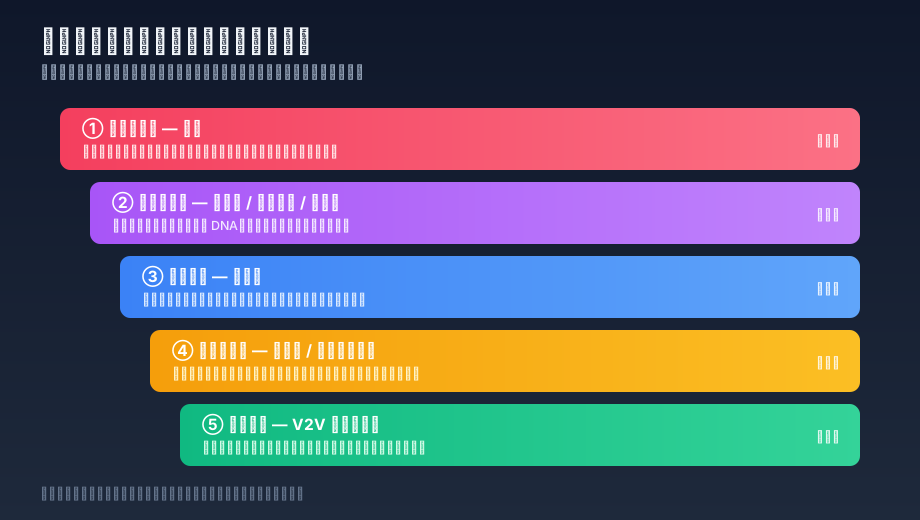
- Space and camera (white model) — the most expensive layer to change, so it gets locked first.
- Identity and appearance (model sheet / multi-reference / nine-panel grid) — orthogonal to space, so it can be prepared in parallel, and the assets carry across episodes.
- Time anchors (first-last frame) — used to nail cut points so shots connect.
- Performance and semantics (prompting / audio-driven lip sync) — the layer a white model cannot supply, and the one close-ups depend on most.
- Post repair (V2V local edits) — the cheapest layer. Push everything that can be solved here down to here.
One cost discipline sits behind that order: keep rework in the lower layers. If a problem can be fixed with a layer-5 local edit, never go back and rebuild the blockout. Conversely, if a problem cannot be fixed at layer 5 — the camera position itself was wrong — then no amount of layer-5 work is anything but waste.
This also explains why 2026's tooling is converging on unified multi-condition frameworks. VACE packs R2V, V2V, and masked V2V into one model; Seedance 2.5 swallows 50 reference assets plus a 3D white model. Same direction: users don't want six techniques across six tools, they want one entry point that accepts six kinds of constraint. I noted the same convergence in the open-source AI video tooling survey — that time at the tool layer, this time at the model layer.
When a white model earns its cost
A usable decision procedure, in order:
- Does this shot have a complex camera move? (orbit, fly-through, big push/pull, repeated focal changes) — if not, skip the white model; I2V is enough.
- Do you need three or more angles on the same set? — if yes, the marginal cost turns positive, because one blockout amortizes across many shots.
- Is the subject a hard surface? (machinery, architecture, cars, products, packaging) — if yes, the payoff is highest. If it's a character close-up or heavy soft materials, the payoff collapses.
- Does a client sign off before the final? — if yes, blockout-stage review alone pays for the technique.
- Does anyone on the team know Blender? — if no, the previous four questions are moot. This is a hard gate; don't plan on learning it mid-project.
Two or more yeses out of the first four: the white model earns its cost. One yes: image-to-video plus references is the better trade.
Where it clearly doesn't earn it: single-shot mood pieces, emotional close-ups, exploratory phases where the brief is still moving, and anything due this week.
Conclusion
A white model isn't "better AI video generation." It is a different cost allocation: it moves uncertainty out of the generation stage and into the production stage. You buy controllability, reproducibility, and a reviewable cut; you pay in up-front hours and a hard 3D-staffing gate.
The real change in 2026 isn't the technique — it existed in the ControlNet era. It is that the technique got first-class product treatment: an official Blender plugin, a native 3D input channel, and a shared model entry point with the other five kinds of constraint. Which means the white model stopped being "an alternative route" and became layer one of the stack.
So for most people the right question isn't "white model or reference images." It's "is layer one locked, and which layer is my rework actually happening in?" If your team rerolls whole shots every week because the camera went wrong, your rework is at layer one and the white model is the answer. If your rework is "the character changed faces," a perfect layer one saves you nothing — go fix layer two.
No technique is better than another. There is only whether it locks the dimension you're currently leaking.
Sources
- ByteDance / Volcano Engine — Seedance 2.5: unveiled at the FORCE conference on June 23, 2026; launched July 31, 2026 with a global premiere on Jimeng; API opened on Volcano Engine August 7, 2026. Closed-beta hands-on covering the 3D white model and Blender plugin workflow
- Runway — Introducing Runway Aleph (July 25, 2025)
- Runway — Introducing Aleph 2.0 and Edit Studio (May 21, 2026 — 30s at 1080p, cross-cut edits, single-frame edit anchors)
- Ali-ViLab — VACE: All-in-One Video Creation and Editing (arXiv:2503.07598, ICCV 2025; 1.3B / 14B production models released May 14, 2025; ~3.9k stars as of August 2026)
- Alibaba Tongyi Lab — Wan2.1-FLF2V-14B-720P (open-sourced April 17, 2025, Apache 2.0, ~5s of 720p from two frames)
- Wan-Video — Wan2.1 repository
- Tesseract Academy — From Blender to AI Video: A Faster Creative Workflow
- ComfyUI — Wan2.1 FLF2V Native Example